Showing posts with label GDrive. Show all posts

How Google Docs Killed GDrive

"In The Plex", Steven Levy's recently launched book about Google, has an interesting story about GDrive, an online storage service developed by Google. People first found about GDrive from a leaked Google document, back in 2006. GDrive (or Platypus) turned out to be a service used by Google employees that offered many impressive features: syncing files, viewing files on the Web, shared spaces for collaborating on a document, offline access, local IO speeds. But Google wanted to launch GDrive for everyone.

At the time [2008], Google was about to launch a project it had been developing for more than a year, a free cloud-based storage service called GDrive. But Sundar [Pichai] had concluded that it was an artifact of the style of computing that Google was about to usher out the door. He went to Bradley Horowitz, the executive in charge of the project, and said, "I don't think we need GDrive anymore." Horowitz asked why not. "Files are so 1990," said Pichai. "I don't think we need files anymore."

Horowitz was stunned. "Not need files anymore?"

"Think about it," said Pichai. "You just want to get information into the cloud. When people use our Google Docs, there are no more files. You just start editing in the cloud, and there's never a file."

When Pichai first proposed this concept to Google's top executives at a GPS—no files!—the reaction was, he says, "skeptical." [Linus] Upson had another characterization: "It was a withering assault." But eventually they won people over by a logical argument—that it could be done, that it was the cloudlike thing to do, that it was the Google thing to do. That was the end of GDrive: shuttered as a relic of antiquated thinking even before Google released it. The engineers working on it went to the Chrome team.

In 2009, Google Docs started to store PDF files and one year later you could store any type of file in Google Docs. The service still doesn't offer a way to sync files. Even if GDrive was never released, Google Docs inherits most of its features. The main difference is that you no longer have to worry about file formats because you can open and edit documents in Google Docs.

{ Thanks, Kristian. }

GDrive Is Coming

After many years of waiting, Google's online storage service will finally be available. It won't be called GDrive, as it will only be an updated version of Google Docs.

"Instead of emailing files to yourself, which is particularly difficult with large files, you can upload to Google Docs any file up to 250 MB. You'll have 1 GB of free storage for files you don't convert into one of the Google Docs formats (i.e. Google documents, spreadsheets, and presentations), and if you need more space, you can buy additional storage for $0.25 per GB per year," mentions Google Docs blog.

The update will be slowly rolled out in the coming days and it's the next step in the evolution of Google's online office suite. When Google added support for PDF files in 2008, it became clear that Google Docs will let you upload any kind of file.


Google says that the service will be able to open many common file formats. "You can search for document files you've uploaded or that have been shared with you just like you do with your Google documents, spreadsheets, presentations, and PDFs. And you'll be able to view many common document file types with the Google Docs viewer."

Google Docs has the potential to become a great service for online storage, but it won't succeed if it only includes 1 GB of free storage. Microsoft's SkyDrive offers 25 GB of free storage, while ADrive offers 50 GB of free storage. Even Gmail has more free storage than Google Docs and its main purpose is not storing files.


{ Thanks, Myron and Norman. }

A Central Place for All Your Google Files

Google Sites added some new features: integration with Picasa Web Albums, feeds, custom templates.

The "insert" dialog from Google Sites is Google's first attempt to aggregate the user generated data from the most important Google services: documents, spreadsheets, forms, presentations, calendars, custom maps, photos, bookmarks. Everything is searchable and you can see a list of most of the documents created using Google services.


We'll probably see this dialog more often when Google adds it to Gmail, Google Calendar or when it morphs into a full-fledged service.

If you don't like that the dialog is part of Google Sites, there's a direct URL for the document picker (internally named "Google OnePick"), but you can't use it to open files.

Google Docs, Slowly Morphing into Google Drive

The new interface of Google Docs, which is slowly rolled out to all users, brings the service one step closer to an online storage service. The "items by type" menu replaced "PDFs" with "Files", suggesting that Google Docs will allow users to upload any type of files.


Google Docs also added the advanced search options that are available in Gmail:

* exact phrase matching ("todo list")
* negative matching (summer -trip)
* disjunctive matching (budget OR invoice)
* built-in labels (is:starred, is:hidden)
* collaborators: to find the documents shared by Michael Robinson, you need to search for: from:michaelr@gmail.com, assuming that's his email address. The problem is that you need to know the email address, since the operator doesn't support (partial) names.

At some point in the near future, Google Docs will allow you to upload any type of files. Some of the files can be edited, other files can be previewed online, while the rest of them are only stored online. For example, PDF files can't be edited online, but you can view them and share them.


It will be interesting to see how Google Drive integrates with other Google services that store files (Gmail, Picasa Web Albums, YouTube) and to find the free quota limits.

Tony Ruscoe found in January an internal Google document about Cosmo, described as an upgrade from GDrive, a service that was only available to Google's employees. "We're in the process of migrating all Google Doc accounts to Cosmo," mentioned the document.

Update: Kevin Mohr found an interesting image referenced in Google Docs' code: . It's a folder icon that includes Google Chrome's logo, so it could be related to Google Chrome OS, a browser-centric operating system that will probably use Google Drive to store files online. There's also an icon for videos which suggests that videos will be uploaded to YouTube.

First Official Description of GDrive

Brian Ussery noticed an interesting reference to GDrive in a file used by Google Pack. The file includes "localized information which is sent to translators".

The product category for GDrive is "online file backup and storage" and there are two lines that describe the application:

"GDrive provides reliable storage for all of your files, including photos, music and documents. GDrive allows you to access your files from anywhere, anytime, and from any device - be it from your desktop, web browser or cellular phone."


If the description is accurate, we can conclude that GDrive will provide a software that could be included in Google Pack, you'll be able to store any kind of files and you'll be able to access them from your mobile phone.

{ Thanks, Brian. }

More Signs of a Google Webdrive

The long-awaited and much-delayed GDrive is likely to be released in the near future as more pieces of its integration are revealed. Cédric Vergé noticed a change in one of the CSS files for Google Apps: there's a class named "webdrive" and an icon for the new service.


When Google released Picasa for Mac, many people wondered what's the mystery behind a menu option titled "Google Web Drive":


Last week, Tony Ruscoe found some traces of an internal Google document which mentioned an update for Google Docs, which will slowly morph into GDrive. Apparently, Google Docs will be the web interface for GDrive, while a Windows/Mac client will integrate the service with the operating system and make it easy to synchronize files.

{ Thanks, Cédric. }

Will GDrive Ever Launch?


This is probably the year of Google's most important product launches. Even if they're much rarer than last year, they are strategically important (personalization, universal search, machine translation, the mobile platform, social gadgets).

Wall Street Journal reports that Google plans to launch a service for storing files. Of course, we all know about GDrive, an internal Google project, and Google's goal to store store 100% of user's data. "With infinite storage, we can house all user files, including: emails, web history, pictures, bookmarks, etc and make it accessible from anywhere (any device, any platform, etc)," mentioned Google in some leaked annotations from a presentation.

But WSJ's article could mean that GDrive's launch is close. "Google is preparing a service that would let users store on its computers essentially all of the files they might keep on their personal-computer hard drives -- such as word-processing documents, digital music, video clips and images, say people familiar with the matter. The service could let users access their files via the Internet from different computers and mobile devices when they sign on with a password, and share them online with friends. It could be released as early as a few months from now, one of the people said."

The article doesn't mention the amount of free storage that will be offered, but Google will probably use the same strategy from Gmail and Picasa Web: some free storage that should be enough for most users and paid storage for everyone else.

"Google is hoping to distinguish itself from existing online storage services partly by simplifying the process for transferring and opening files. Along with a Web-based interface, Google is trying to let users upload and access files directly from their PC desktops and have the file storage behave for consumers more like another hard drive that is handy at all times, say the people familiar with the matter."

The idea of mapping the online storage as an external drive is not new and you can already do this with tools like Gmail Drive or services like .Mac or Box.net. But Google really needs an application for uploading more files at once to Google Docs or Gmail, so the GDrive uploader could be useful to add files to a shared area, directly accessible from all Google services. Now it's difficult to upload files because there are so many different Google services that let you upload different kinds of files (documents, photos, videos etc.)

"Google is hoping the new storage service will help tie together some of its other services through a single search box, says one of the people familiar with the matter. So a user might be able to conduct a single search by keywords to find his own privately stored files, regardless of whether they're accessed through Picasa, Docs or a software program running on the user's computer."

Hopefully GDrive will bring enough free storage (AOL's Xdrive offers 5 GB for free), a simple way to transfer and synchronize files, integration with Gmail, Google Docs and other Google services. If Google actually decides to launch GDrive.

{ Thanks, Jaime. }

Update: thanks to those who read the WSJ article more carefully, I changed the message of this post from "GDrive will certainly launch soon" to "GDrive could launch in a few months, but it's not very sure".

Google Photo Picker

The standard Google dialog for choosing a photo integrates with Picasa Web Albums. If you want to add a photo to your orkut scrapbook, you can select it from your computer, from the web or from Picasa Web Albums. When you upload photos from your computer, they're saved in an album called "Drop Box". For each Blogger blog, Google creates an album that stores the images uploaded to that blog.

That means we could expect to see other Google apps using the same model. Google Docs could have an album that contains all the images uploaded to your documents, spreadsheets and presentations. The Gmail album would include all your image attachments. This way, you wouldn't have to upload the same image multiple times and you could reuse in other Google sites.

It's unclear why Google doesn't provide in the dialog an option to search your images from Picasa Web Albums. You still have to know the location and the name of an image. Google could extend the photo picker to documents and other files, move Google Desktop online and provide an unified way of uploading, organizing and sharing your files.


The Disjointed GDrive (or Where Do I Upload My Files?)

It's pretty weird to be a company that wants to move your data online, but not have a central place for uploading and managing that data. The long-awaited and much-delayed GDrive could be that place. But for now you have to spread your files in way too many places, with different interfaces, restrictions and options.

What Where Limits How
Documents : .html, .txt, .rtf, .doc, .odt, .csv, .xls, .ods, .ppt Google Docs Documents: 500 KB. Spreadsheets: 1 MB. Presentations: 10 MB. Maximum 5000 documents and presentations, 200 spreadsheets. One by one or by email.
Photos: .jpg, .gif, .png, .bmp * Picasa Web Albums
* Blogger
* orkut
* Picasa Web: 20 MB per image. 1 GB free space.
* orkut: 5 MB per image, up to 25 images.
One by one, by email, using an ActiveX control, a Mac uploader or using Picasa. The photos uploaded in Blogger are hosted by Picasa Web.
Videos: .mpg, .mp4, .avi, .wmv, .rm * Google Video
* Picasa Web Albums
* Blogger
* YouTube
* Google Video: 100 MB per video for the web uploader. Unlimited size for the desktop uploader.
* For Picasa Web, the maximum space is 1 GB.
* For YouTube, you can upload videos that have less than 100 MB and less than 10 mins.
* Google Video: from the web or using a desktop uploader.
* For Picasa Web, you can only use Picasa.
* For YouTube, you can only upload videos from the web interface.
Any file * Google Page Creator
* Google Groups
* Google Project Hosting
* Google Base
* Gmail
* Pages/ Groups/ Project Hoting: Maximum 10 MB per file. 100 MB free space for a site/group/project.
* Google Base lets you attach up to 15 files and less than 20 MB to an item; it has restrictions for file types.
* The maximum size for Gmail's attachments is 20 MB. You can't upload executable files.
* Only from the web interface. No way to group files.
* Google Project Hosting should be used to host open source software.
* You can use Gmail Drive, a 3rd party software "that creates a virtual filesystem around your Google Gmail account, allowing you to use Gmail as a storage medium". Don't upload too many files in a short time.

{ Idea by Philipp Lenssen. }

Pay for More Gmail Storage

Google will start to use a model similar to Picasa Web's premium plans to let you buy more storage for different Google services, including Gmail. So for $20 a year, you'll get 6 GB that can be used to store photos in Picasa Web Albums and to send or receive messages in Gmail. It's unclear whether Google intends to add other services, but Google Docs and Page Creator are possible candidates.

You can manage your storage options from this page. Here are the current plans for upgrade:

* 6 GB ($20.00 per year)

* 25 GB ($75.00 per year)

* 100 GB ($250.00 per year)

* 250 GB ($500.00 per year)

(Note: Initially, the price for the 6 GB option was $1, but Google quickly changed it to $20.)


In February, Sergey Brin announced that Google "will start selling additional storage capacity to e-mail users with extraordinary needs". While not many people need more than 2.8 GB for storing mail, the unified storage could be more useful because you can manage it dynamically, like a virtual hard drive.

So the good news is that you have more storage options: Picasa Web costs much less, you can upgrade your Gmail storage in case you run out of space and GDrive is closer. The bad news is that others offer better prices: Yahoo Mail offers unlimited storage for free, Flickr gives you unlimited storage for $25 a year and Microsoft's SkyDrive is already here.


{ Via Google Blogoscoped. Screenshot from Keith. }

Is JotSpot Google's Glue?

Many people wondered why Google bought JotSpot, a wiki company. After all, JotSpot let you create and share documents, spreadsheets, calendars, photos, videos and more. Google already has different services for most of these types of files, but they aren't integrated (or the integration is very limited).

Guillaume Belfiore suggests that JotSpot could integrate all the communication services created by Google into a single interface - let's call it GDrive. "In the end, many existing Google services would be accessible in one place. To me it is pretty obvious that, should GDrive become true one day, it will make an extensive use of the JotSpot technology," says Guillaume.

To get an idea, visit this gallery from JotSpot that shows applications for their free-form wiki model ("everything is a wiki"):

* spreadsheets (think Google Spreadsheets)
* blogs (Blogger)
* forums (Google Groups)
* mail (Gmail)
* calendar (Google Calendar)
* photo gallery (Picasa Web Albums)
* and more (project manager, to-do lists, file cabinet, knowledge base)


Here's what Scott Johnston from JotSpot says about this:

"At Google we will continue to realize our vision of collaborative applications built on an integrated development platform."

Closer to GDrive and Google Lighthouse

Almost one year ago, some interesting details were accidentally revealed in a Google presentation:
With infinite storage, we can house all user files, including: emails, web history, pictures, bookmarks, etc and make it accessible from anywhere (any device, any platform, etc).

We already have efforts in this direction in terms of GDrive, GDS, Lighthouse, but all of them face bandwidth and storage constraints today. For example: Firefox team is working on server side stored state but they want to store only URLs rather than complete web pages for storage reasons. This theme will help us make the client less important (thin client, thick server model) which suits our strength vis-a-vis Microsoft and is also of great value to the user.

As we move toward the "Store 100%" reality, the online copy of your data will become your Golden Copy and your local-machine copy serves more like a cache. An important implication of this theme is that we can make your online copy more secure than it would be on your own machine.

Another important implication of this theme is that storing 100% of a user's data makes each piece of data more valuable because it can be access across applications. For example: a user's Orkut profile has more value when it's accessible from Gmail (as addressbook), Lighthouse (as access list).

At that time we didn't know too much about GDrive or Lighthouse. But in one year, a lot of interesting things have happened:

GDrive
In July we found about GDrive, an internal Google product that gives Google employees:

* Backup. If you lose your computer, grab a new one and reinstall Platypus. Your files will be on your new machine in minutes.
* Sync. Keep all your machines synchronized, even if they run different operating systems.
* VPN-less access. Not at a Google computer? View your files on the web at http://troutboard.com/p.
* Collaborate. Create shared spaces to which multiple Googlers can write.
* Disconnected access. On the plane? VPN broken? All your files are still accessible.
* Publish. All of the files you store on Platypus are automatically accessible from the (corporate) web.
* Share. Other Googlers can mount your Platypus folders and open your files in read-only mode.
* Local IO speeds. Open and save as quickly as you could if you were accessing them from your C: drive.

While the service is available only for Google employees, we can assume it will be publicly available when it will be ready. It's also interesting to note the storage is far from being unlimited (500 MB).

Lighthouse
If GDrive lets you store files, Lighthouse lets you edit them. A few days after showing the presentation, Google bought Writely. In June, it launched Google Spreadsheets and then merged the two products, which are now known as Google Docs & Spreadsheets. The product didn't intend to be a Microsoft Office replacement, just a usable tool that lets you edit documents collaboratively. The new Google Toolbar for Firefox lets you associate Office documents with Google Docs, and also open any Word or Excel document from the web directly in Google Docs. Gmail also added options to open attachments in Google Docs. Unfortunately, there's no way to synchronize local files with their online versions or use Google Docs offline (these seem perfect additions for a new version of Google Desktop).

Picasa Web Albums, launched in June last year, was another step towards Lighthouse. This time, you could store your photos and create simple albums easy to share with your friends. The client (Picasa) was already available, so Picasa Web Albums came naturally. Unfortunately, the free storage (250 MB) seemed too little and the storage was pretty expensive, while the service lacked a lot of features (tags and search were added at the end of the year).

Google Desktop
Google Desktop didn't evolve too much last year. The only interesting new feature ("search across your computers") could be expanded to actually sync your local data with the data stored on Google's servers. Google Desktop could be the bridge that connects your computer with different Google services and makes them more useful. Of course, there's a trade-off here: your privacy.

If you connect all these pieces, you'll notice we're not very far from a better integration of Google services, that will result in a diminishing role of the computer. "Today we live in the clouds. We're moving into the era of "cloud" computing, with information and applications hosted in the diffuse atmosphere of cyberspace rather than on specific processors and silicon racks. The network will truly be the computer," said Google's CEO in The Economist.

Google Persistent Memory

Google launched many features that deal with saving personal stuff, but the big picture in which all of them will be integrated is yet to be revealed.

Search across computers (Google Desktop)
Index and search the documents and viewed web pages from across all your computers.

Save Google Gadget content and settings (Google Desktop)
Access gadget content and settings like To Do lists, Scratch Pad notes, favorite stocks, and more from any computer.

Google Browser Sync
Google Browser Sync for Firefox is an extension that continuously synchronizes your browser settings – including bookmarks, history, persistent cookies, and saved passwords – across your computers.

Search History
Search History lets you view and manage your history of past searches and the search results you've clicked on.

Gmail
Don't throw anything away. Over 2755.742333 megabytes (and counting) of free storage so you'll never need to delete another message.

Do you see a pattern here? Google wants to create a persistent memory for all your virtual belongings: your queries, your bookmarks, your history, and ultimately your files. When you leave a footprint on a computer, it should propagate to Google and become a persistent footprint, something you can retrieve from any other computer connected to the Internet. The computer is just a cache, a temporary place until the information becomes universally available. Wherever you go, you have your online history with you. All the pages you've visited, all the searches you've made, all the chat logs, all the documents.

Google wants to blur the distinction between your personal computer and the web. The first visible sign was when they integrated desktop search interface into Google.com. The second step is creating online tools that partially replace similar desktop applications (see Gmail, Calendar, Writely, Spreadsheets). The third step will be synchronizing the files between online and offline applications and solving the right access problem (what's public, private or restricted).

You can have more than one computer, and all the files will be synchronized. You can be at a public computer and still view and edit your files.

While GDrive is not yet here, its first signs are clearly visible. GDrive will have two components: a desktop client which will be Google Desktop and an online interface that will integrate most of Google's online replacement tools.

"With infinite storage, we can house all user files, including emails, web history, pictures, bookmarks, etc and make it accessible from anywhere (any device, any platform, etc)" was the prophecy and the first signs are already here. As in Dali's painting, the vague memories erased by time will be recreated and kept alive.

Related:
Mozy - Online backup
Box.net - Free online storage

GDrive Is On The Way


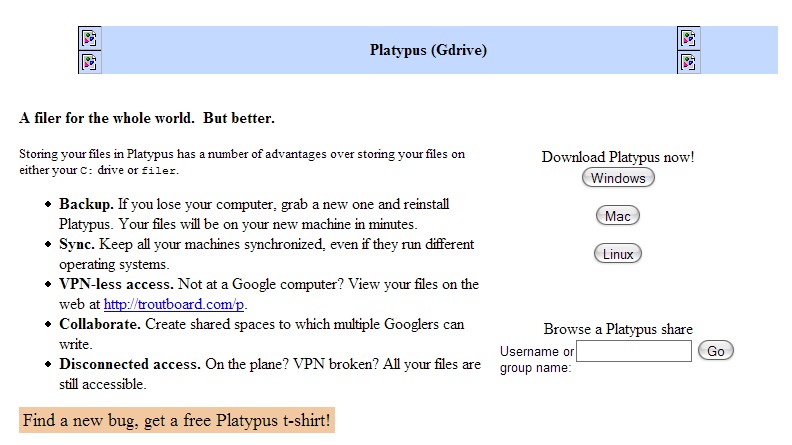
Corsin Camichel discovered something strange: the page http://writely.com/index.html (not available anymore, but you can see the screenshot and a mirror), showed an introduction to GDrive, code-named Platypus, a Google service that allows you to store files online. The links sent you to pages from Google's intranet, but the page listed the features of the product, which are quite impressive:

* Backup. If you lose your computer, grab a new one and reinstall Platypus. Your files will be on your new machine in minutes.
* Sync. Keep all your machines synchronized, even if they run different operating systems.
* VPN-less access. Not at a Google computer? View your files on the web at http://troutboard.com/p.
* Collaborate. Create shared spaces to which multiple Googlers can write.
* Disconnected access. On the plane? VPN broken? All your files are still accessible.
* Publish. All of the files you store on Platypus are automatically accessible from the (corporate) web.
* Share. Other Googlers can mount your Platypus folders and open your files in read-only mode.
* Local IO speeds. Open and save as quickly as you could if you were accessing them from your C: drive.


The text marked with italic is commented in the source code. Most likely, GDrive is only available to Google employees, at least for now.

GDrive also has a desktop client for Windows, Mac and Linux that works a file manager. GDrive wants to be a free alternative to a network-attached storage. Your files will be accessible via an Internet connection, rather than being only on your computer.

It's very difficult to understand how this page got on Writely's site, but it was an accident. Hopefully, Google will manage launch the rumored GDrive, the online storage system with unlimited space. This will be one of the biggest projects ever made by Google and will require a great deal of computing resources.

Google talked about GDrive in March at Google's Analyst Day. Here's a quote from the leaked presentation:
With infinite storage, we can house all user files, including: emails, web history, pictures, bookmarks, etc and make it accessible from anywhere (any device, any platform, etc).

We already have efforts in this direction in terms of GDrive, GDS, Lighthouse, but all of them face bandwidth and storage constraints today. For example: Firefox team is working on server side stored state but they want to store only URLs rather than complete web pages for storage reasons. This theme will help us make the client less important (thin client, thick server model) which suits our strength vis-a-vis Microsoft and is also of great value to the user.

As we move toward the "Store 100%" reality, the online copy of your data will become your Golden Copy and your local-machine copy serves more like a cache. An important implication of this theme is that we can make your online copy more secure than it would be on your own machine.

Related:
Infinite storage, bandwidth and CPU
Google acquires Writely

Infinite Storage, Bandwidth, and CPU Power

Some more interesting ideas from Google's Analyst Day presentation.

In a world with infinite storage, bandwidth, and CPU power, here's what we could do with consumer products.

Theme 1: Speed

Seems simple, but should not be overlooked because impact is huge. Users don't realize how slow things are until they get something faster.
Users assume it takes time for a webpage to load, but the experience should really be instantaneous.
Gmail started to do this for webmail, but that's just a small first step. Infinite bandwidth will make this a reality for all applications.

Theme 2: Store 100% of User Data

With infinite storage, we can house all user files, including: emails, web history, pictures, bookmarks, etc and make it accessible from anywhere (any device, any platform, etc).
We already have efforts in this direction in terms of GDrive, GDS, Lighthouse, but all of them face bandwidth and storage constraints today. For example: Firefox team is working on server side stored state but they want to store only URLs rather than complete web pages for storage reasons. This theme will help us make the client less important (thin client, thick server model) which suits our strength vis-a-vis Microsoft and is also of great value to the user.
As we move toward the "Store 100%" reality, the online copy of your data will become your Golden Copy and your local-machine copy serves more like a cache. An important implication of this theme is that we can make your online copy more secure than it would be on your own machine.
Another important implication of this theme is that storing 100% of a user's data makes each piece of data more valuable because it can be access across applications. For example: a user's Orkut profile has more value when it's accessible from Gmail (as addressbook), Lighthouse (as access list), etc.

Theme 3: Transparent Personalization

The more data, access, and processing Google can handle for the user, the greater our ability to use that data to transparently optimize the user's experience.
Google Desktop w/ RSS Feeds is a good first example: the user should not have to tell us which RSS feeds they want to subscribe to. We should be able to determine this implicitly.
Other potential examples: User should not have to specify the "From" address in Google Maps; user should not have to specify which currency they want to see Froogle prices in; user should not have to manually enter their buddy list into Google Talk.

From Geeking with Greg
Related Posts Plugin for WordPress, Blogger...