Showing posts with label Mobile. Show all posts

Google Tests a New Mobile Navigation Bar

Some Google users spotted an experimental interface for Google's mobile search site. The horizontal navigation bar now includes icons, just like the vertical desktop bar. While the new interface is less streamlined, it looks more like a Web app and it makes it easier to select a different search service or a Google app.


{ Thanks, Andrew and David. }

More Features in Google Maps for Mobile Browsers

One of the most underrated Google mobile Web apps is Google Maps. Most smartphones and tablets have a native app for Google Maps, so a mobile Web app doesn't seem necessary. Unfortunately, native apps aren't always updated frequently and there are many missing features. Google does a good job at updating Google Maps for Android, but Apple's Maps app for iOS rarely includes new Google Maps features.

That's probably one of the reasons why the Google Maps mobile site was updated to include most of the features from the desktop site. Another reason is that Google wants to offer "a consistent Google Maps experience wherever you use it."

The updated Google Maps mobile site has features like local business search, Google Places, driving directions, layers, My Maps, starred locations, search suggestions. If you can't find biking directions or information about businesses in the Maps app for the iPhone, you can go to maps.google.com in your mobile browser and use these features.


Just like the mobile YouTube site, "Google Maps for mobile browsers is platform independent - you will always get a consistent experience and the latest features without needing to install any updates, no matter what phone you use."

I've tried the updated mobile interface on an iPhone 3GS, a Nexus One and an iPad 2. While all the new features are great, the site is still too slow and unresponsive to be useful. Until Google solves performance issues and mobile browsers become more powerful, people will still use the native app.

Android: Past, Present and Future

Google I/O's first keynote was all about Android and there were many impressive announcements.

Android stats continue to be surprising: 100 million activated Android devices, 400,000 Android devices activated every day, 200,000 apps in the Android Market, 4.5 billion apps downloaded from the Android Market, 310 Android devices.

The next major Android release is called Ice Cream Sandwich and the goal is to create a unified operating system that runs on phones, tablets and TVs. Ice Cream Sandwich will be released later this year, but there's a Honeycomb 3.1 update that adds support for USB accessories and for Google TV. This summer, people who bought Google TV devices will be able to install Android 3.1 and run apps from the Android Market.


Android users from the US can now rent movies from the Android Market. "You can choose to rent from thousands of movies starting at $1.99 and have them available across your Android devices — rent a movie on your home computer, and it'll be available for viewing on your tablet or phone. You can rent from Android Market on the web today, and we'll be rolling out an update to Verizon XOOM customers beginning today. We'll start rolling out the update to Android 2.2 and above devices in the coming weeks," informs Google.


There's no music subscription service, but Google launched an invitation-only service that stores all your music on Google's servers and lets you stream it from almost any computer and Android device.

iPhone/iPod/iPad users can install the latest software updates for at least two years, but that's not always the case when it comes to Android devices. Some Android phones run outdated software at launch and not all of them are updated to the latest version because phone manufacturers and carriers don't think that's really important. Google and some of the other members of the Open Handset Alliance (Verizon, HTC, Samsung, Sprint, Sony Ericsson, LG, T-Mobile, Vodafone, Motorola and AT&T) started to develop some guidelines for updating firmware. "To start, we're jointly announcing that new devices from participating partners will receive the latest Android platform upgrades for 18 months after the device is first released, as long as the hardware allows," informs Google.

Google also developed Android Open Accessory, "which allows external USB hardware (an Android USB accessory) to interact with an Android-powered device in a special accessory mode. (...) Many previously released Android-powered devices are only capable of acting as a USB device and cannot initiate connections with external USB devices. Android Open Accessory support overcomes this limitation and allows you to build accessories that can interact with an assortment of Android-powered devices by allowing the accessory initiate the connection."

Probably the most interesting announcement is Android@Home, a framework that allows Android devices to communicate with home appliances and other devices. It's an ambitious project that could make home automation part of everyday life. That's also one of the main reasons why Google bought Android: bringing Google's software to new devices, finding new ways to use Google's information in everyday life, creating an ecosystem of smart devices with standard features and APIs that make "the world's information" more useful.

Google Music Streaming

Wall Street Journal reports that Google will unveil a music streaming service at the Google I/O developer conference.

"Users of the service are expected to be able to listen to songs they have uploaded to the service in a so-called streaming mode but won't be able to download the files themselves. That limit appears to be a bid by Google to hinder the service from being used to spread pirated music. (...) The service is unlikely to be tied to an online music store like Amazon MP3, which gives users the option of adding new songs to their music locker at the time they buy them."

If you go to http://music.google.com/music/, you'll get an error message: "We're sorry. Music Beta is currently only available in the United States," but you'll at least see Google Music's logo, borrowed from a new version of the Android music app.


Update: As Google's blog informs, "Music Beta by Google [is] a new service that lets you upload your personal music collection to the cloud for streaming to your computer and Android devices. With the new service, your music and playlists are automatically kept in sync, so if you create a new playlist on your phone, it's instantly available on your computer or tablet. You can use a feature called Instant Mix to create a playlist of songs that go well together. You can even listen to music when you're offline: we automatically store your most recently played music on your Android device and you can choose to make specific albums or playlists available when you're not connected. The service is launching in beta today to U.S. users and is available by invitation." While it's in beta, the new service is available for free. To upload your music, you can use a Windows/Mac application called Media Manager. There's also a new version of the Android music app that has a new interface and integrates with the Google Music service.


{ Thanks, Scott. }

Better Google News in Opera Mini

Opera Mini is one of the most popular mobile browsers, but not many websites optimize their interface for Opera Mini. Most Google services have two mobile interfaces: a basic WAP interface and a more advanced interface for smartphones. Opera Mini always displays the basic interface because the browser is actually a thin client that can't handle web apps properly. Fortunately, there's an exception to this rule: Google News shows the smartphone interface in Opera Mini.


"While the Google News team has been hard at work redesigning our service for smartphones, we've also been thinking about our milllions of users around the world who access the web not from a smartphone, but from a feature phone, using Opera Mini as their browser. So we have rolled out a redesigned Google News for Opera Mini in all 29 languages and 70 editions of Google News. This includes an enhanced homepage featuring richer snippets, thumbnail images, links to videos and section content without explicit navigation, a convenient search bar, comfortably spaced links and the ability to access your desktop personalization on your phone," informs Google.

Google's blog post ignores that Opera Mini is also available for iOS, Android, Symbian and other mobile operating systems, so it's not just a browser for feature phones. Opera Mini is really useful while roaming, for slow Internet connections and for data capped mobile contracts. Hopefully, Google News won't be the only Google service optimized for Opera Mini and Google services like Google Docs, Google Calendar, Picasa Web Albums will fully support Opera's desktop browser.

The Brilliant Bing for iPad

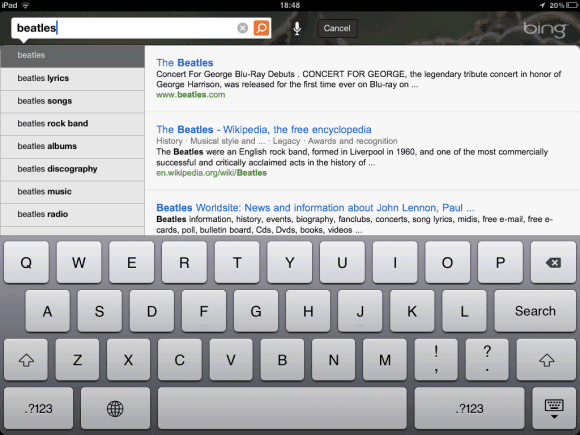
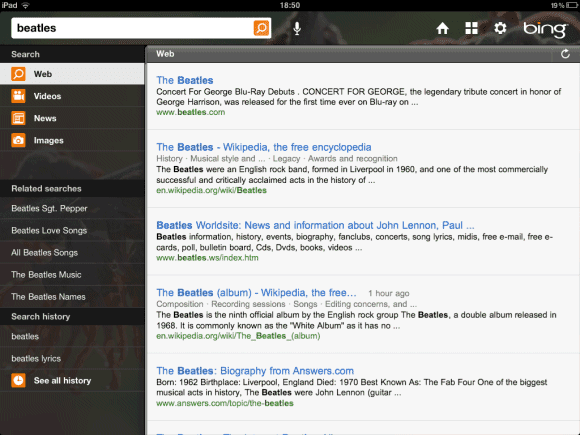
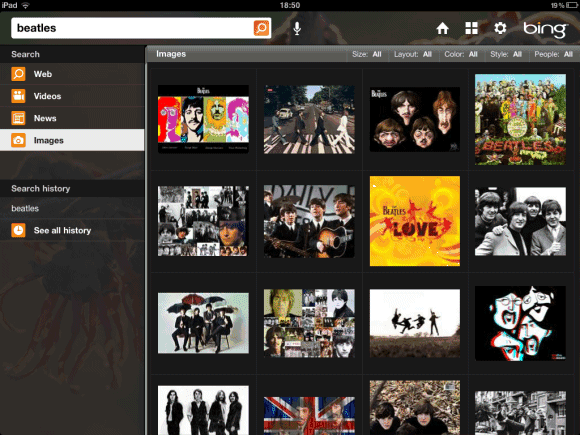
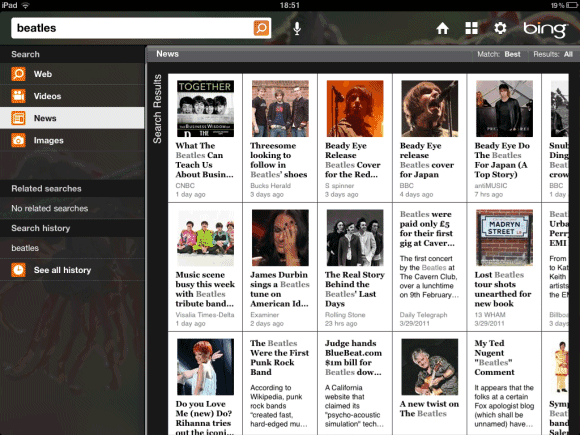
Microsoft has recently released an iPad app for Bing that's really impressive. "Bing for iPad goes beyond the traditional search experience, offering a unique and visually rich way to search the Web. The app is designed from the ground up for touch. You can quickly browse news, movies, Bing homepage images, local business listings and much more – all with the swipe of your finger," informs Bing's blog.

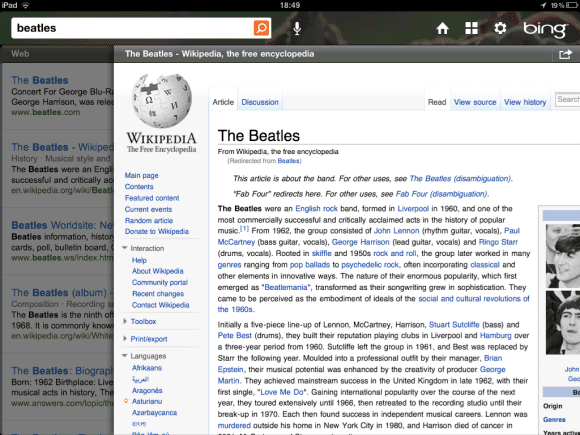
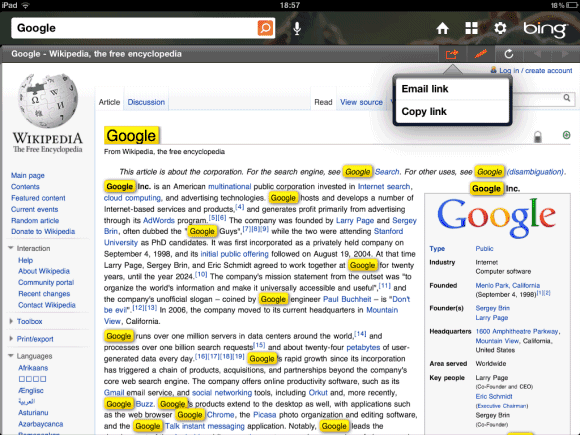
Bing for iPad transforms a bland search engine into a visual application that lets you interact with information. The app is fluid, the integration of all the specialized search engines is almost seamless and there are a lot of small features that make your life easier. For example, you can quickly highlight matches, go to the next image result using gestures and go back to the list of search results using a back swipe.


Unfortunately, Bing's results aren't always great, but they've improved a lot lately. Voice search didn't work well for me and there's no visual search.

Google doesn't have a search app developed specifically for iPad, but there's a universal app for iPhone and iPad that adds features like voice search and visual search to the standard Web interface. The latest version of the app added two gestures that enhance the interface, but many users complain that they slow down the app. While Google's results are still better, Google has a long way to go to catch up when it comes to the user interface.

Google's iPhone App, a Preview of the Mobile Search Interface

Google updated the search app for iPhone and unveiled a completely new interface that uses gestures for navigation. There are only two gestures, but they're so simple, powerful and intuitive that I'm sure they'll be used in other mobile Google interfaces.

"When browsing through search results or looking at a webpage, you can swipe down to see the search bar or change your settings. (...) We also included a new toolbar that will make it easier for you to filter your results. You can open this toolbar by swiping from left to right — either before you search or once you've got your results," explains Google.

The new gestures are easy to learn and they're more expressive than buttons. You can swipe down to see the search box even after clicking a search result.


Google Fast Flip for Mobile Web Search

Google calls it Instant Preview for Mobile Search, but it's actually a new interface based on Google Fast Flip that lets you preview search results. "Starting today, Google Instant Previews is available on mobile for Android (2.2+) and iOS (4.0+) devices across 38 languages. Similar to the desktop version of Instant Previews, you can visually compare search results from webpage snapshots, making it easier to choose the right result faster, especially when you have an idea of the content you'd like to see," explains Google.


Google replaced the stars that allowed you to bookmark results with the new zoom icons for Instant Preview. If you click on a zoom icon, you'll see a completely new interface that lets you preview one search result at a time. It's interesting to see that Google's screenshots show the mobile versions of the web pages.

Google Translate App for iPhone

Yet another Google app initially developed for Android makes its way onto the Apple App Store: Google Translate. It doesn't have all the features of the Android app: there's no conversation mode, no SMS translation, Google Suggest or a list of related phrases. Another issue is that the font size is way too big.

The application has a feature that's not available in the Android app: full-screen mode, so it doesn't make sense to use a such a big font size which is not even configurable. Google says that "the ability to easily enlarge the translated text to full-screen size" makes it "much easier to read the text on the screen, or show the translation to the person you are communicating with. Just tap on the zoom icon to quickly zoom in."


Why would you use the native application instead of visiting translate.google.com? The native application supports voice input for 15 languages, text-to-speech for 23 languages and it's better suited for quickly switching between multiple languages.

{ via Google Mobile Blog }

Android Market for the Web

Google has finally released the Web-based version of the Android Market, which is now available at market.android.com. You can link to applications, find apps from your computer and install them over the air.

Android Market for the Web includes all the applications, not just the ones that are available for a certain device or a certain version of Android, so it's much more comprehensive than the application that's installed on your Android device. You'll be able to find paid apps even if you live in a country where you can only install free apps and you'll be able to find apps that require Froyo even if your phone still uses Android Donut. In fact, you don't even have to be an Android user to explore the Market.

I've tried to install an application from the web site, but Google shows an "invalid request" error after the authentication process.


To make the Market even better, Google announced two additional features that will be available soon: in-app purchases and fixed pricing for various currencies. That means you'll see less apps that cost $1.73 or €2.26, assuming that developers will adjust their prices.

From Android to iPhone: Google Shopper


More and more Google applications that used to be available only for Android are now ported to the iPhone. After Google Voice, Google Latitude, Google Places, Google Goggles (a feature of the Google Mobile App), iPhone users can now download Google Shopper, a product search tool that recognizes barcodes, supports voice search and lets you compare prices at online stores and local stores. It's actually a mobile version of Google Product Search that knows your location and has more input methods.

Google Shopper saves your history and lets you star products, but it doesn't integrate with Google accounts, so your data is only available on a single device. Another issue is that voice search times out too fast, so it's quite difficult too use.

According to Google, "Shopper is available for iPhone 3GS and iPhone 4 with iOS 4.0+ in English only for the United States and the UK."


There are still many Android-only apps (Sky Map, Google Translate, Gmail, Google Talk, Google Reader, Google Maps Navigation, Google Finance, Gesture Search) and it's likely that some of them will be available in Apple's App Store in the coming months.

Android Honeycomb's Browser Supports SVG

One of the most annoying things about Android's built-in browser was the lack of support for SVG (Scalable Vector Graphics). Android's browser was the most popular mobile browser that didn't support SVG and that was surprising, considering Google's push for better web apps.

Ariya Hidayat tried to see if Honeycomb's browser can handle SVG files and the good news is that the answer is affirmative. Hopefully, the next Android release for smartphones will include this feature.

Google Transcoder's Zooming Feature

If you're trying to load a web page using your mobile phone's browser, but the Internet connection is slow and you can't install Opera Mini, there's always Google Transcoder. Google's service shows a simplified version of the page that hides navigation links, removes scripts and compresses images.

Google Transcoder also has a "zoom out" feature that shows a screenshot of the page and lets you select the section you want to read. This means that Google has at least two databases of screenshots for all the indexed pages and Google knows a lot of about the structure of a web page.

Google Goggles Solves Sudoku Puzzles

Google's visual search tool has a new trick up its sleeve: solving Sudoku puzzles. Google Goggles 1.3 for Android scans barcodes much faster, recognizes print ads from the major U.S. magazines and newspapers, but most people will probably ignore those useful features and will try to see if Goggles can actually solve Sudoku puzzles. The nice thing is that this feature also works in the latest version of Google Mobile App for iPhone, along with print ads recognition.

"Now, Goggles on Android and iPhone can recognize puzzles and provide answers to help make you faster than a Sudoku champ. So if you ever get stuck, take a clear picture of the entire puzzle with Goggles and we'll tell you the correct solution," explains Google.

Maybe providing a hint would also be useful, especially if you want to solve the puzzle.


The new features show that Google Goggles has a lot of potential, but it's still not useful enough in the real world. An interesting article from Xconomy quotes Hartmut Neven, Google's technical lead manager for image recognition, who says that Goggles is not yet an universal visual search tool. "What keeps me awake at night is, 'What are the honest-to-God use cases that we can deliver,' where it's not just an 'Oh, wow.' We call it the bar of daily engagement. Can we make it useful enough that every day you will take out Goggles and do something with it?"

Mobile Blogger Templates

This year, Blogger's team added so many new features that it's difficult to count them: dynamic templates, comment spam filtering, a new way to manage comments, real-time stats, better post preview, static pages and so much more. Blogger is one the few Google products that have improved dramatically this year, after many years when it was neglected.

Since a lot of people use phones to browse the Web, it makes a lot of sense to add a mobile interface for Blogger and to create mobile versions for Blogger's templates. There's no mobile Blogger yet, but all Blogger blogs have a mobile version optimized for WebKit browsers. Just add ?m=1 to the URL of any Blogger blog, and you'll get a simplified version that works well on an iPhone, Android phone and probably other phones that use a browser based on WebKit. Here's an example: http://googlesystem.blogspot.com/?m=1.


Bloggers can enable the mobile version of their blogs, so that visitors are automatically redirected to this version when they're using a supported mobile browser. This option is only available if you go to Blogger in Draft, click on "Settings", switch to "Email & Mobile" and enable "Yes, On mobile devices, show the mobile version of my template." This didn't work for me, so you'll still see the regular mobile version of this blog that uses a custom stylesheet.

Google says that the new feature only supports 12 existing templates (6 variants of the Simple template and 6 variants of the Awesome template) and that all the other templates will be rendered as the Simple template. The mobile version drops the sidebars and most of the gadgets, shows small excerpts from the posts on the homepage, hides the comment form (but you can still post comments), resizes images and videos, adjusts fonts and converts AdSense ads into mobile ads. Unfortunately, you can't customize mobile templates, at least not yet.

Google Latitude App for iPhone

Google has finally released a native iPhone app for Google Latitude. The web app is nice, but you can't use it to update your location in the background. Google Latitude for iPhone uses one of the new features in iOS 4 that allows applications to track your location even if they aren't in the foreground. That's the main reason why it requires an iPhone 3GS, iPhone 4 or iPad 3G running iOS 4. (Update: According to Google, "the Google Latitude app will run on the iPhone 3GS, iPhone 4, iPad, and iPod touch (3rd/4th generation). However, background location updating is only supported on the iPhone 3GS, iPhone 4, and iPad 3G.")


The native app is better because it shows more information about the locations of your friends and it sends you to the map view when you click on a friend, but the web app is just a layer in Google Maps and this makes a lot of sense. Google Latitude should not be a standalone app, it should integrate with Google Maps and Google Contacts, so you can quickly find your friends.


Marissa Mayer, Google's VP of geographic and local services, has recently said that Google Latitude will add explicit check-ins, inspired by Foursquare. "Latitude is useful for a smaller group of people. Only a handful of people you'll want to know where you are at all times. There will be new layers coming on top of it. It's more useful when more people are on it. And implicit and explicit — yes, the check-in. Maybe that's in Latitude or maybe it's in Maps."

Edit Documents in Mobile Google Docs

Until today, the mobile version of Google was only useful if you wanted to read a document or download some of your files. From now on, documents will no longer be read-only. If you have a phone or a tablet that runs Android 2.2+ or iOS 3.0+ and the Google Docs interface language is set to English, you'll be able edit documents from your mobile device and the best thing is that you don't need to install a new application.

"It's easy to get started: visit docs.google.com in a browser on a supported device, and select the document you want to edit. Then, when you're viewing it, press the Edit button to switch to the mobile editor," suggests Google.

I couldn't find the Edit button, but that's because the new features aren't yet available to everyone. Google promises that the mobile editor will be rolled out in the next few days and you won't have to buy an iPad or a Samsung Galaxy Tab to use it because it will also work on an iPhone or an Android phone that runs Froyo.

Unfortunately, the mobile editor will only work for documents created using the new document editor. It's difficult to understand why Google couldn't find a way to convert the documents created using the old editor to the new format.

Google Maps Navigation for Australia and New Zealand

Google's free navigation software is now available in Australia and New Zealand. "Google Maps Navigation is a feature of Google Maps for Mobile that provides voice-guided turn by turn directions in real time. That means that instead of printing out your directions in advance, or having your co-pilot read aloud from list of directions, you can use your Android smartphone to guide you there directly," explains Google. To use this feature you need a smartphone that runs Android 1.6 or a more recent version of Android.


At the moment, Google Maps Navigation is available in 17 countries, but this number will increase when Google starts to use its own mapping data in other countries. As Greg Sterling points out, "at some point during the course of the past couple of years, perhaps catalyzed by the shock of Nokia's roughly $8 billion acquisition of Navteq, Google decided it needed to 'own' maps top to bottom. Since that time the company has been making a systematic effort to collect and improve the base data for this highly strategic product. That's partly what Street View driving is about: getting roads and other data for Maps (and now Navigation) in addition to imagery and WiFi hotspot locations."

Google Voice iPhone App

After almost two years of waiting, Google Voice's iPhone app has been finally approved in the App Store. It looks much better than the HTML5 web app and you can enable push notifications for voicemail and text messages.


Google Voice for iPhone doesn't beat the Android app because it doesn't integrate with the standard phone app, doesn't synchronize the inbox and doesn't offer advanced options for notifications, but that's because iOS has many limitations.

Google says that the application requires iOS 3.1 or a more recent version of Apple's mobile operating system. Google Voice is still limited to the US, but you no longer need an invitation to use it. Hopefully, Google will add support for the VoIP service from Gmail in a future update.

Google Goggles-Enabled Ads

Google tests a way to monetize Goggles, the mobile application for visual search. "A year ago, Google introduced a smartphone application that lets users take photos of objects and get search results in return. The company will take that capability into the world of marketing with an experiment allowing five [US] brands to use the application in their promotional materials". Here are the five brands that are part of the experiment: Buick, Delta, Diageo, Disney and T-Mobile.

Android and iPhone users in the US will be able to scan the magazine ads for Buick Regal, T-Mobile G2 and the movie posters for Disney's "Tron: Legacy" to find more information from the official sites.

Michael Slinger, Google's head of mobile search advertising sales in North America, says that "it's a learning experiment for us more than an opportunity to make money," but it could be another reason to use Google Goggles.

Related Posts Plugin for WordPress, Blogger...