Showing posts with label Google Chrome OS. Show all posts

Chromebooks

Fast, simple, secure, built for the Web, doesn't require administration. It's a Chromebook, a Chrome OS notebook that will be available starting from next month.

"Chromebooks will be available online June 15 in the U.S., U.K., France, Germany, Netherlands, Italy and Spain. More countries will follow in the coming months. In the U.S., Chromebooks will be available from Amazon and Best Buy and internationally from leading retailers," informs Google.

Google's simplified computing model puts the browser at the core and creates an operating system that revolves around Google Chrome. Samsung and Acer are the launch partners. Samsung's notebooks have 12.1" displays, Atom Dual-Core processors, 16 GB solid state drives, weigh 1.48 kg and get 8.5 hours of continuous usage. They're similar to the Acer notebooks, which have 11.6" displays, a higher resolution, but only get 6 hours of usage. Some of the notebooks include 3G support, while other notebooks are Wi-Fi only. "The Samsung Chromebook will cost $429 in the U.S. for the Wi-Fi only version and $499 for the 3G version. Acer's Wi-Fi only Chromebook will cost $349," reports CNet.

Here's one of the Samsung Chromebooks:


While Chromebooks don't require administration, businesses and schools need a way to manage hundreds or thousands of notebooks, so Google decided to offer a service that includes a cloud management console, support, device warranties and regular hardware refreshes for only $20/user (schools) or $28/user (businesses).

Chromebooks are actually the real netbooks, lightweight and inexpensive computers built for simple tasks like browsing the Web. Unfortunately, netbooks are no longer very popular and users replace them with tablets like the iPad, which have better displays, better battery and are easier to use. For now, Chromebooks will compete with Windows netbooks and it won't be easy to convince people to buy a Chrome netbook when they could run Chrome on a regular netbook. The good news is that Chromebooks will force Google to improve its web applications, to offer more advanced features, more free storage and all Google users will benefit even if they don't buy a Chromebook.

Chrome OS Is All About the Missing Features

Here's an interesting quote from Ted Power, a former designer for Google's mobile web apps:

"Chrome OS could potentially mark a profound leap forward. For the first time, all the layers between the network and the computer have been removed. The device itself is of little consequence; you can 'feel right at home' from any networked device. Chrome OS isn't so much about what has been added, but what has been stripped out; no more complicated file systems, software updates, etc."

Paul Buchheit, the ex-Googler who created Gmail, thinks that the ideal design of a computer that acts like a local node of a global super-computer matches the design target of Chrome OS. "It should be relatively cheap and reliable, secure (no viruses or anything), zero-administration (I don't want to be a sys-admin), easy to use, and fast." Paul says that Chrome OS is unnecessary because iOS and Android devices meet the same ideal and there are already millions of devices that run these operating systems.

There are already millions of people who use Chrome and some of them would like to buy a computer that's as fast as their browser. Mobile phones are not yet powerful enough to handle complex web apps, but that will change and, at some point, web apps will be indistinguishable from native apps. You'll be able to use your favorite web apps from almost any device, but why not use a device that removes everything that's unnecessary and slows you down?

Win a Chrome OS Notebook

When I started this blog, Google Operating System was just a metaphor for a future when Google's apps will make your operating system irrelevant. We're not yet there, but we're close and Chrome OS is an attempt to show what's possible right now.

If you'd like to try an early version of Chrome OS on a notebook that's optimized for Chrome OS, post a short essay on the future of computing in a comment and you can win a Cr-48 Chrome notebook.

Here are the rules:

1. This competition is only open to USA residents. Google can't ship the notebook outside USA due to product certification requirements.
2. You must be 18 years of age or older.
3. Your essay must be original and it must be written in English.
4. You should a include a way to contact you: a link to your Google profile, a link to your website, a link to your Twitter account etc.
5. If you win the notebook, you're expected to use it regularly and send your feedback to Google.
6. The competition ends 1:59pm Pacific Time on December 14.
7. Only one of you will win the notebook.

Good luck!


Update (December 14): Thank you for all your great comments. I'll announce the winner tomorrow.

Update 2: We have a winner.

Google Chrome OS and Disposable Computers

When you use a Chrome OS computer, most of your data and your settings is saved online, so it doesn't really matter which Chrome OS computer you're using. Just sign in with your Google account and you can find your bookmarks, your applications and maybe even your documents.

Chrome OS computers are actually designed for sharing and there's even a guest mode based on Chrome's incognito mode. "When you use web apps on your Chrome notebook, all your documents are stored safely in the cloud. But certain kinds of files, like downloads, cookies, and browser cache files, may still be present on your computer. Your Chrome notebook encrypts all this data using tamper-resistant hardware, making it very difficult for anyone to access those files. With Guest Mode, you can let friends use your Chrome notebook without signing in. They can use the web freely, but they won't be able to access your email or other data. And once they sign off, all their browsing data is permanently erased from your computer," explains Google.

Glen Murphy, who is a Chrome user interface designer, tried to show what happens when an inexpensive Chrome OS notebook is damaged. Your data is still available because it's stored online and you can resume your work using another computer.

Chrome OS, Google's True Operating System

After today's Chrome event, it became clear that Chrome OS is Google's true operating system and Android is just a placeholder. Google says that web apps are the native apps in Chrome OS and there are a lot of cool applications in the Chrome Web Store, which is now available.


Chrome OS is still an early project and it's not yet ready for primetime, so the first Chrome OS notebooks will be available in mid 2011. For now, Google focuses on notebooks, but that will change in the future.

Google realized that cloud computing wasn't successful 15 years ago because there weren't great Web applications. Now there are a lot of great apps and Chrome Web Store is the place where you can find some of them. We'll see a lot of iPhone and Android developers creating web apps that work in Google Chrome, but also work in other browsers.

Check the New York Times web app, which has a beautiful interface, it's customizable and also works offline.


Chrome now has 120 million active users, up from 40 million users one year ago. This number will grow next year, when people will buy Chrome OS devices. Google hopes that Chrome OS will become one of the top 3 operating systems in terms of usage, but it won't be easy to achieve this. For some people, a Chrome OS notebook will be the main computer, for others it will be a secondary device. What's important is that users will have a great platform for running web apps, a computer that doesn't require maintenance, it's really secure and easy to use.

Chrome OS is "nothing but the web". It may seem limited, but it's actually open ended. It's a platform that lets you access the web instantly, that's always connected and always in sync, it's built for sharing with other people, it's up-to-date and it's constantly improving.

Chrome OS is the obvious extension to Chrome. Why use a bulky operating system that requires maintenance, it's slow and insecure when you can switch to a lightweight operating system that's fast, free and refreshing? If Chrome can open in 3 seconds, why can't the operating system load so fast? Chrome OS is an operating system that doesn't need drivers to print, doesn't need an antivirus to be secure and doesn't need to store or process your data. Chrome OS could make computers exciting once again and the best part is that you won't have to use it to benefit from its influence.

Further reading and exploring:
* Google's blog post about the Web Store and Chrome OS
* Chrome Web Store
* Chrome OS website
* Chrome OS pilot program for US early adopters: get a free Cr-48 Chrome notebook.

Google Will Launch Chrome Web Store and Chrome OS Today

Today is an important day for Google Chrome: Google will launch Chrome Web Store, a marketplace for web apps, and Chrome OS, the first browser-centric operating system. Google has uploaded two introductory videos to the YouTube channel, but they're not yet publicly available. Here are some snapshots from the videos:

Chrome OS Tour

Chrome Web Store: Museum of Thieves (Flash game)

Chrome Web Store: Sports Illustrated

Google has already announced the launch event a few days ago: "On December 7, we will host an event in San Francisco where we plan to share some exciting news about Chrome. The event will be webcast live on YouTube at: www.youtube.com/googlechrome. Mark your calendars for 10:30 a.m. PST and tune in."

{ Thanks, Emanuele. }

Chrome OS Tablets, Only for Early Adopters?

Google's CEO, Eric Schmidt, made an interesting comment about Chrome OS and the potential users of a Chrome OS tablet:
Chrome OS, Schmidt said is focused on selling Netbook-class computers to early believers in cloud-based storage. The first devices, which he reiterated will come this year, will use either Intel or ARM chips, have a keyboard and won't have local storage beyond that needed to cache data.

"People who believe in cloud computing, believe in the benefits of Web computing and who are Chrome users will be the target market," he said. "It's probably a large market."

Google Chrome has more than 70 million users, but not all of them switched to Chrome because it's a good platform for Web apps. Few Chrome users will decide that Google Chrome is the only important application they use and migrate to a Chrome OS tablet. Google should promote the tablet as a complementary device for browsing the Web and running Web apps, a device that boots quickly, updates automatically, doesn't require maintenance or security software.


It's interesting to read Andy Rubin's blog post that explains why Google decided to close the Nexus One online store:

"While the global adoption of the Android platform has exceeded our expectations, the web store has not. It's remained a niche channel for early adopters."

Google Chrome Web Store

One of the reason why mobile app stores are successful is that applications are more discoverable. Users know where to find applications, there's a consistent interface for ratings and reviews, an easy way to buy applications and to compare them.

For web applications there's no web store and it's not always easy to find a good web app. Since Google Chrome OS is an operating system designed for running web apps, it's really important for Google to provide a list of high-quality web applications. Users may need an online photo editor, a music player, a chess game, a Math software or an online IDE.

Chrome Web Store will be launched later this year and intends to be "an open marketplace for web apps". Users will be to "install" applications by adding a shortcut to the new tab page. When you "install" an application, it can integrate with the browser by using advanced features that require permission: local storage, user's location, notifications.


"An installed web app could be separated visually from other tabs, could integrate better with the OS, and could be granted increased permissions. This special handling of web apps is exactly what we're working on in Google Chrome. Installing a web app in Google Chrome is easy and quick, with no restart required. At its simplest, installing a web app is like creating a super-bookmark to it. Once installed, a web app gets a big icon in Google Chrome's app launcher area, as well as some integration with the host OS," explains Google.


Even if the web applications from the Chrome Store will work in other browsers, Chrome will include some features that make it easier to use the applications. It will be interesting to see how many paid apps from the Chrome Web Store will be successful.

Update: You can already install applications in the latest Chromium builds. This post explains how to add the "enable-apps" flag and shows an example of application.

More Google Chrome OS Screenshots

Google posted more images that show the user interface of Google Chrome OS. The interface is still under development, so it may change until the first stable version is released, later this year.

Chrome OS uses an interesting visualization for tab overview. "The overview is available via either gesture and hotkey. It provides a visual way of switching between windows and tabs. Windows are exploded into the tabs they contain, and all tabs/windows are visible in a single 2.5d space. This model is largely based on Peter Jin Hong & Elin Pedersen's G.L.I.D.E. Tab Navigation. We present tabs in a venetian blind arrangement, ensuring visibility of the top left of every page, and using perspective to compress the most useful portions of the page into the available strips. Favicons are presented as an alternative visual aid."


Google also posted some screenshots of the open/save dialogs and the download shelf panel. "The shelf is an on demand target for downloading and uploading. It acts as a temporary resting place for files that have been accessed, and for content being uploaded to websites."

Even if the Chrome OS only lets you use a browser, you can still download files and open them using Chrome's multimedia libraries or using web applications like Google Docs.


A notification panel will be used for OS and website notifications, so web applications will be able to add their own alerts.


Chrome OS will also include simple applications like a calculator:


{ via TechCrunch }

Google Cloud Print

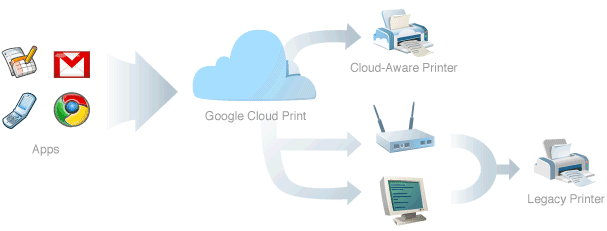
Google found an interesting solution for printing documents in Chrome OS. Instead of preloading the drivers for the most popular printers, Chrome OS will use an online service for printing: Google Cloud Print.
In Google Chrome OS, all applications are web apps. Therefore, in designing the printing experience for Google Chrome OS, we want to make sure printing from web apps is as natural as printing from traditional native apps is today. Additionally, with the proliferation of web-connected mobile devices such as those running Google Chrome OS and other mobile operating systems, we don't believe it is feasible to build and maintain complex print subsystems and print drivers for each platform. In fact, even the print subsystems and drivers on existing PC operating systems leave a lot of room for improvement.

Our goal is to build a printing experience that enables any app (web, desktop, or mobile) on any device to print to any printer anywhere in the world. This goal is accomplished through the use of a cloud print service. Apps no longer rely on the local operating system (and drivers) to print. Instead, apps (whether they be a native desktop/mobile app or a web app) use Google Cloud Print to submit and manage print jobs. Google Cloud Print is then responsible for sending the print job to the appropriate printer, with the particular options the user selected, and providing job status to the app.

The only problem is that no printer supports Google Cloud Print and that's why Google revealed some details about the service's interfaces, hoping that printer manufacturers will update their software and support it. If a printer doesn't support Google's service, you'll need a proxy software for the computer where the printer is installed. Google says that the proxy software will be bundled with Google Chrome.

Google wants to associate your printers with a Google account and manage them the same way as you manage Google Docs documents, so you can share them with other people. Web applications can use APIs to customize the printing options and change the user interface displayed when you start printing a document.

"We believe cloud printing has tremendous benefits for end users and for the industry and is essential, given the rapid shift toward cloud-based applications and data storage. We also believe that the only way that the benefits of cloud printing can be realized is if the protocols are open, freely implementable, and, when possible, based on existing industry standards. We expect there to be multiple cloud print services, and users should have a choice in which services they use and which printers they can connect to a service. Stay tuned for more details. We are confident that cloud-aware printers will soon be a reality," suggests Google.

It may seem that Google's solution is complicated and difficult to implement: we need an open standard for cloud printing, cloud-aware printers and users need to associate printers with an online service. Instead of sending the printing job directly to the printer, you'll send it to the online service, which forwards it to the printer. Despite all these hurdles, Google Cloud Print allows you to print documents from a mobile phone, tablet, notebook or any other mobile device. You'll be able to print files from an Android phone or tablet, from a Chrome OS computer, from any computer that runs Google Chrome and from other devices that will support Google Cloud Print.

Eric Schmidt on Chrome OS

At Google Atmosphere, a CIO event about cloud computing, Eric Schmidt explained why Chrome OS is meaningful:

"The promise of Chrome and Chrome OS is that the devices that you give to your employees will have a 2-second boot time, will be completely disposable and the price will be incredibly low."

Chrome OS computers will no longer be personal because it doesn't matter which computer you use. After logging to your Google account, Chrome OS will retrieve your bookmarks, themes, settings, web history from Google's servers. Your data is stored in a central location and you can access it from all your devices.

Computers will boot almost instantly, so you no longer have to wait. They'll be cheap, easy to replace and to maintain.

You can already use Chrome on your computer, but a Chrome OS computer is optimized for running a browser, doesn't have extraneous software and it's inherently more secure.

Chrome OS Tablet Mockups

Hot on the heels of the Apple iPad announcement, Google released some mockups for Chrome OS tablets.

"On tablets, the UI would be adjusted to handle larger touch targets. Initial explorations have maintained the same basic chrome layout, but enlarged the controls. Icons could be placed above tabs to provide larger, square targets. Panels would be placed along the bottom edge and could be opened with upward dragging motions," explains Google.


Even if Chrome OS was initially designed for netbooks, Google hopes to create an operating system that works on tablets, laptops and desktop computers. "Each would have vastly different input methods, available screen space, and processing power".


Chrome OS has the advantage of a simple interface optimized for web applications. This may seem too restrictive, but Chrome, Safari, Firefox and other browsers are quickly evolving and many popular apps are migrating to the web.

{ via TechCrunch }

Google Chrome OS Use Cases


Google didn't do a good job at explaining the intended use of Chrome OS and many people wondered if Google's operating system is an alternative to Windows. The goal is to build "an operating system that provides a fast, simple, and more secure computing experience for people who spend most of their time on the web". Here are the initial use cases for Chrome OS:
* Computing on the couch
* Use as a lightweight, secondary work computer
* Borrowing a device for use in coffee shops and libraries
* Sharing a second computer among family members

For now, Chrome OS is not designed to be your main operating system. It's just a fast way to get online, a simplified operating system that removes unnecessary software and opens the browser in a few seconds. If Google Chrome loads almost instantly, why not build an operating system that boots fast and doesn't slow down the browser?

Even though developers can view its source code and compile it, Chrome OS won't be available for download because it requires a special hardware configuration and it's not designed for multi-boot. Chrome OS is just the platform for Chrome OS netbooks.

"We are taking out every unnecessary process, optimizing many operations and running everything possible in parallel. This means you can go from turning on the computer to surfing the web in a few seconds. Our obsession with speed goes all the way down to the metal. We are specifying reference hardware components to create the fastest experience for Google Chrome OS," explains Google.

Google Chrome OS Event

Google will announce more information about Chrome OS at a press event that starts at 10:00am PST. Google will offer "an update on Google Chrome OS and provide at the work that has been done thus far, an overview of the technology, and launch plans for next year. Speakers will include Sundar Pichai, Vice President of Product Management and Matthew Papakipos, Engineering Director for Google Chrome OS." You can watch the live webcast here.

Meanwhile, the source code for Chrome OS is already available. Here's the login screen:


... and one of the wallpapers that are included:


Chrome OS is a lightweight Linux distribution based on Debian that uses a lot of open-source software: Host AP Linux drivers, PAM (an authentication mechanism), Syslinux (a lightweight bootloader), IBus (Intelligent Input Bus for Linux / Unix OS), ConnMan (Internet connection manager), XScreenSaver and other software. More on this later.

Other sites live blogging the event:

* Gizmodo
* Matt Cutts

Live blogging:

- Chrome OS launches next year

Chrome, the foundation of Chrome OS
- Chrome has 40 million users
- Chrome focuses on: speed, security, simplicity
- new stuff: Chrome for Mac/Linux and extensions

HTML5: making the web more powerful
- powerful web apps
- web apps should use threads
- offline web apps

Converging trends
- netbooks have an explosive growth
- millions of users are living in the cloud

Chrome OS:
- instant boot
- Chrome on Chrome OS is faster
- every app is a web app
- all data is in the cloud
- browser security model

Demo:
- 7 seconds boot time
- the UI is a work in progress
- easy to access favorite apps
- app menu
- panels: persistent lightweight windows (example: Google Talk)
- file browser
- local files open in web apps (including Microsoft Office online apps)
- native video player


Under the hood:
- design documents
- no hard disks, only solid-state drives
- verified boot
- security: the OS does not trust any app
- read-only root file system
- user data synced to the cloud
- automatic updates for the entire OS


Market:
- reference hardware
- you can't download Chrome OS and install it on your machine
- the only way to install the OS is to buy a Chrome OS machine
- the target launch time: the end of next year

What is Google Chrome OS?
- the web browser is the most important program on your computer
- your browser is your operating system


Chrome OS, an Extended Google Chrome

As previously anticipated, Chrome OS is a Linux distribution that includes a custom version of Chrome as the default browser. Google has recently posted a build of the custom Chrome and some people installed the .deb package (it's no longer available officially, but you can download it from other sources).

Chrome for Chrome OS is not very different from the browser you can already install in Windows, Linux or Mac. The main difference is that the browser includes UI elements from a traditional operating system: clock, battery status, network settings.


Since Google Chrome will include most of the features that are necessary to use an operating system, it's obvious that the browser is the only visible component of Chrome OS, a lightweight browser-centric operating system.

There's no reason to anxiously wait for Chrome OS, when you can already use Chrome in your favorite operating system and get the same features. A metaphor has become reality, but the result fails to impress.

On Browsers and Operating Systems

An interesting excerpt from "The Microsoft case: antitrust, high technology, and consumer welfare" by William Hepburn Page and John E. Lopatka, especially if you read it in light of Google's announcement that it will release a browser-centric operating system:
First, [Microsoft] included IE with Windows and required OEMs not to delete it. Second, it designed IE and Windows in such a way that it was difficult for anyone, OEMs or end users to delete it. The legality of Microsoft's contractual and technological linking of the browser and the operating system arose first in the interpretation of the 1995 consent decree and then in the 1998 case in the application of sections 1 and 2 of the Sherman Act. The issue in the consent decree case was whether the browser and the operating system were integrated, and therefore specifically exempt from the decree's anti-tying provisions. The Sherman Act section I issue was whether the browser was illegally tied to Windows, either contractually or by design. The Sherman Act section 2 issue was whether the technological and contractual linking of the browser and the operating system constituted illegal maintenance of a monopoly in operating systems. (...)

In his findings of fact, Judge Jackson treated Microsoft's contractual and technological bundling of IE and Windows as a single strategy to constrict the OEM channel. He first found that browsers are separate from operating systems. Consumers think of the browser as simply software that allows them to gain access to information on the Web. Some consumers want the browser provided separately from the operating system, either because they want a browser other than IE or because they do not use a browser and do not want one taking up space on the hard drive. Other operating system producers bundle a browser with their operating systems but they allow OEMs and users to delete it. Microsoft prohibits deletion even though it offers different versions of its browser separately for non-Windows operating systems.

Instead of integrating its own browser in Chrome OS, Google will build the operating system as an extension of the browser. In less than 10 years, browsers have evolved from being one of the many applications that can be installed on a computer to being an essential application that could even be used to replace a traditional operating system.

You're Already Running Google Chrome OS

If you use Google Chrome and Google's web applications, then you're already running Google Chrome OS. Just maximize Google Chrome's window and imagine that each tab is an instance of an application. Gmail is your mail client, Google Calendar is the calendaring application, Google Docs is the office suite and the file explorer. Google Chrome's new tab page is the desktop, the dashboard that lists frequently used applications and lets you add widgets.

Chrome loads fast, is spiffy and always up-to-date, so you don't have to deal with managing updates or synchronizing data. Some of your applications store data locally and you can use them even when you don't have an Internet connection. You're running 3D applications, portable software, music players, photo editors, development environments inside your browser. Google Chrome OS is a challenge: are browsers and web applications mature enough to replace traditional software?

By the time the operating system is released, Chrome will integrate plug-ins like Native Client and o3d, while Google Docs will already become the place that gathers all the files stored in Google's services. Chrome OS won't bring anything that's not yet possible on your current operating system, it will force you to change your mindset and make the operating system irrelevant.

Google Chrome OS won't be a traditional operating system, it will just be a wrapper for the cloud.


Now let's re-read Google's announcement from July:

"Speed, simplicity and security are the key aspects of Google Chrome OS. We're designing the OS to be fast and lightweight, to start up and get you onto the web in a few seconds. The user interface is minimal to stay out of your way, and most of the user experience takes place on the web. (...) The software architecture is simple — Google Chrome running within a new windowing system on top of a Linux kernel. For application developers, the web is the platform. (...) People want to get to their email instantly, without wasting time waiting for their computers to boot and browsers to start up. They want their computers to always run as fast as when they first bought them. They want their data to be accessible to them wherever they are and not have to worry about losing their computer or forgetting to back up files."

The clues about Chrome OS aren't very exciting probably because the operating system wants to negate its own existence and become invisible.

What Do You Expect from Google Chrome OS?

I've asked some time ago the readers of this blog what they expect from Google Chrome OS, an open-source operating system built around Google Chrome, that will be released later this year. Here are some of their answers:

Integration with Google Accounts

"I believe Google accounts will be used to login to Chrome OS. Kinda whereever you go, you can use your Google account username/password to login. I hope it will use local disk to store frequently accessed file and sync it to Docs like Dropbox."

It should work offline

"There would have to be some kind of offline credential caching so you can log on even when you are not connected to the network."

Instant boot

"The thing I need with Google Chrome OS is instant bootup. I want something where I open up my laptop and the screen turns on and puts a web browser in my face."

It should be fast

"I just want to get rid of infinite waiting for load up. When I turn on my computer, half the times is just to open a web browser, a media player and an instant messaging program. I don't want to have to wait AGES for all sorts of background programs and services to load up."

Built-in desktop search

"I like the desktop search element of Google Desktop: it's a good way to access my files, e-mails and web history quickly. That should be included in Chrome OS. And there should be an offline cache of everything, so that I can still see read web pages I've visited even when offline."

In sync

"Syncing is important these days. Not just bookmarks, but passwords, and "user states" so you can pick up on another machine almost where you leave off on one. I would be able to start working on a document on my desktop machine and then switch to my laptop and hit the road, confident that when i open the document authoring app I'll be right where I left off."

Invisible

"Google ChromeOS should save screen real estate. On smaller devices like netbooks, you need to conserve as much screen real estate as possible."

Use applications without installing them

"Even if storage memory is cheaper now than ever, mobile phones, netbooks, etc. will benefit of avoiding to install software specific for each use on the physical memory and maintaining it "in the cloud". Sites should have the capability (and maybe a standard protocol) to communicate each other with the browser as a medium (avoiding the download and following upload of the object), user should have the capability to chose the service that he wants to subscribe to (eventually choosing it from an online appstore-like site), the OS should be able to recommend new and interesting service to subscribe to the user based on information collected (with his permission) about his behaviour."

Run Windows applications

"I want to run Windows programs, as well as games. I want Chrome OS to be able to do everything a normal computer can do! That way I can get ditch Windows and get Chrome OS for (hopefully) free!"

Don't forget the hardware!

"Driver support for a wide range of mobile hardware -> platform hardware combination. I'm particularly interested in WiMax support on an ARM processor."

So people want a fast operating system that loads instantly, doesn't use too many resources, saves your data online so you can continue your work from another computer and it keeps the data in sync, works offline, uses applications without installing them, runs Windows applications and it's compatible with many combinations of hardware.

What do you expect from Google Chrome OS?
Related Posts Plugin for WordPress, Blogger...