Showing posts with label Knowledge. Show all posts

Abandoned Knol

Knol's homepage says a lot about the current state of the project. There's a big empty section called "what's new", a single featured knol that has 1,000 views, while the "most discussed" section doesn't include any knol and the search feature no longer works properly.

Knol has been last updated in December 2009 and it's obvious that the service has been abandoned. Somebody needs to close Knol before it's too late.


If you want to find a list of abandoned Google products, check the copyright notice at the bottom of their homepage and see if it's been updated. Friend Connect, Google Desktop and Knol still show an old message: "©2009 Google".


Update (one day later): Knol is up and running again, but for how long?

Knol's Equation Editor

Knol, Google's knowledge sharing service launched last year, has improved with a lot of new features that have gone unnoticed: collections, templates, categories, Google Analytics integration, review scorecards.

A recent feature added to Knol is a basic equation editor that uses the LaTeX markup language. "This markup language beautifully aligns, sizes and indents mathmatical symbols after they are expressed using a combination of standard letters, words and punctuation characters. The typical LaTeX equation is difficult to read until it is rendered by the typesetting engine that produces an image with the right size, layout and margins that you would expect to see in the equation if it were written in a book. Even though LaTeX can be used to format and markup entire documents, we only support the subset of the LaTeX language that is used to describe mathematical equations and expect that you'll use the standard Knol editor to handle formatting for the rest of your document."


The equation editor is not very user-friendly, so it's a good idea to be familiar with LaTeX, but it will hopefully be improved and added to other Google services, like Google Docs.

Wolfram Alpha, the Answer Engine

Wolfram|Alpha launched yesterday and it's an useful complement to a general-purpose search engine like Google. Wolfram|Alpha doesn't search the web, it uses data from authoritative databases and an engine powered by Mathematica to obtain the results.

"Wolfram|Alpha aims to bring expert-level knowledge and capabilities to the broadest possible range of people—spanning all professions and education levels. Our goal is to accept completely free-form input, and to serve as a knowledge engine that generates powerful results and presents them with maximum clarity," explains the "about" page.

Even if the homepage's simplicity reminds you of Google, it's a good idea to check the examples page before entering a query. Alpha can't handle any kind of query, so it's important to know its strengths: advanced Math calculations (graphs, equations, prime numbers computations, matrix operations), conversions, facts about weather, population, food, minerals, people, places.

You can enter simple things like numbers, dates, words, HTML color codes, chemical formulas and you'll get a lot of interesting information. The service shows intuitive visualizations and comparisons to better understand the information.


Wolfram|Alpha could be a great way to expand Google Calculator and other Google OneBoxes.

Audio Knols

Google Knol tests a cool feature that automatically converts articles to audio files, which can be played or downloaded. For now, the option is available for a small number of knols, like this one about multiple sclerosis.

"We are experimenting with Audio Playback as an option for some knols, starting with a handful of English language featured knols. If this experiment is successful, we may make Audio Playback available to more knols in additional languages, and additional features," mentions a Knol help page.


Hopefully, Google will add support for text-to-speech conversions to other services like Google Docs, Google Reader or Google Book Search.

More Internal Links in Google Knol

Knol, Google's knowledge repository, has recently improved the way articles are interlinked. When you create a link, Knol shows search results for the selected text, promoting its own content.


Some knols include an automatically-generated list of related knols in the sidebar:


Unfortunately, it's hard to find high-quality articles other than the knols featured on the homepage. The top search results for [Yahoo], [marine biology], [Alan Turing] and many other popular queries are articles copied from Wikipedia. Knol could easily filter these articles from search results, especially considering that Wikipedia has a conflicting license.

Did you spot any interesting knols? I found a well-documented history of Arctic explorers, a tutorial about photography composition and an introduction to usability.

Useful links:
* Knol's changelog
* the most visited knols

Knol's Advanced Search

Knol has recently added a search toolkit that lets you build advanced queries, a feature that wasn't available at launch. Many of the options from Google web search can be used in Knol: phrase search, negative terms, OR search. You can also restrict the search to titles, summaries, authors, reviews, recent knols. Google offers three options for ordering the results: by relevance, by creation date, by last modified date and an interesting "reverse sort".


The advanced search option should be a good way to discover knols related to a topic, but it fails to properly rank the knols. In a search for [Google Reader], the top result is a page copied from Google Reader's help center that has a higher rating than the second result, which is more relevant. If you don't use the advanced search, Knol shows less but better results.

A search for [the] returns 29315 results (507 edited in the past 24 hours), which should be close to the total number of knols, but many of them include content that already exists on the web, aren't very detailed or well-formatted. You can still find some good knols, but the signal-to-noise ration seems to be low. The knols that receive some attention are those that are featured on the homepage, but Google only features 5 hand-picked knols daily.

Share Your Expertise in Google's Knol

Knol is a new Google service created for sharing knowledge. The service has been announced in December 2007 and it's now publicly available.

Knol has much more in common with Squidoo and HubPages than with Wikipedia. The service is centered around authors: each Knol article displays the name of its author and links to a small biography. Google even lets you verify your identity, but this only works if you live on the US.


Knol doesn't intend to become an encyclopedia, so there's no single article about a topic. An author can write about almost any topic, but it's recommended to write authoritative content.

There are three levels of collaboration in Knol:

* open collaboration (any Knol user can edit the article)
* moderate collaboration (any Knol user can suggest changes to the article - enabled by default)
* closed collaboration (only the co-authors can edit the article)

Google uses a rich-text editor borrowed from Page Creator, so it's much easier to edit knols than Wikipedia articles. Users can rate the articles, add comments and write reviews, much like for scholarly works.


By default, articles are licensed as Creative Commons Attribution, but you can change the license in the settings. It's nice to see that Google encourages the use of flexible licenses that allow content reuse.

Like in Blogger, Google provides an option to monetize your articles using Google AdSense, but the ads are displayed in a fixed position. Knol doesn't let you customize the layout of the page and you can't add JavaScript code, objects or iframes.

Search Engine Land says that Knol is a service created by Google's search quality team. "I do believe [Knol] does solve a search problem. The problem we have, unlocking what people know and bringing it online. This is another tool to help release some of this knowledge," explains Cedric Dupont, the product manager for Knol.

While Google has many other services that allow people to share their knowledge (Blogger, Google Docs, Google Sites), Knol encourages experts to make the search results better by sharing what they know. After all, Knol articles are indexed by search engines and Google promises to not give them preferential treatment.

"Your name is behind your knol, and it should reflect your unique point of view. Be succinct, but comprehensive on your topic of choice. Provide references, and display your credentials. Readers will want to know who you are and gain context on the knols you are writing." - these are some of the guidelines for writing good Knol articles.

I think that Google managed to develop a very solid service with a lot of interesting features that encourage originality (a list of web pages with similar content), a sense of ownership (your name is included even in the URL) and information accuracy (peer reviews and suggested edits).


Update. Some example of knols: How to Backpack, Buttermilk Pancakes, Type 1 Diabetes, A Distributed Document Repository.

Google Knol, an Encyclopedia Written by Experts

Udi Manber from Google writes about a new service for sharing knowledge called knol.

"Earlier this week, we started inviting a selected group of people to try a new, free tool that we are calling knol, which stands for a unit of knowledge. Our goal is to encourage people who know a particular subject to write an authoritative article about it. The tool is still in development and this is just the first phase of testing."

Unlike Wikipedia, Knol wants article written by people who are an authority on a subject. The articles written in Knol are more like scientific papers because they have clearly defined authors, references, even if they don't necessarily include original research. "We believe that knowing who wrote what will significantly help users make better use of web content," explains Google.

Knol will be open to anyone and it will be interesting to see how Google verifies your identity. If you claim to be Nelson Mandela, how can Google know that this claim is real?

Google provides tools for editing the text, hosts the article and allows you to monetize it (but that's not required). Obviously, Google can't guarantee that an article is accurate or complete and that's the small role of a community: rate the articles, write reviews and suggest edits.

"Once testing is completed, participation in knols will be completely open, and we cannot expect that all of them will be of high quality. Our job in Search Quality will be to rank the knols appropriately when they appear in Google search results. We are quite experienced with ranking web pages, and we feel confident that we will be up to the challenge."

Google did a similar thing when it allowed people in the news to comment on news articles. The number of comments is very small (around 150 for the last 30 days), but they're interesting and add a lot to a story.

Wikipedia managed to become one of the most important sites on the web even if it allowed anyone to edit an article. According to the online encyclopedia, "The English Wikipedia edition passed the 2,000,000 article mark on September 9, 2007, and as of December 13 it had over 2,125,453 articles consisting of over 921,000,000 words. Wikipedia's articles have been written collaboratively by volunteers around the world and the vast majority of them can be edited by anyone with access to the Internet. Having steadily risen in popularity since its inception, it currently ranks among the top ten most-visited websites worldwide." But one of the most important problem of Wikipedia is that articles lack credibility and it's difficult to tell if they contain accurate information. Assuming Google manages to verify people's identity, Knol could solve this problem.

Udi Manber, who heads the project, told Danny Sullivan that the main goal is "to help people put knowledge on the web that doesn't currently exist, which in turn should make search better, since there will be better information out there." Google certainly hopes to attract important authors and that's probably the reason why Udi Manber talked about the project on Google's blog. But how will the project scale when it becomes available to the public?

Google Answers to Relaunch as Google Q&A

Google intends to relaunch the question-answering service Google Answers, which was closed last year. In Google Answers, "users could post a question (...) and specify how much they were willing to pay for an answer. A researcher then searched for the information they wanted and posted it to Google Answers." Some of the former Google Answers researchers built a similar service at Uclue.com.

Google Q&A, code-named Confucius, no longer has paid experts and works in a similar way with Yahoo Answers. Google Q&A was launched in Russia in June and in China, two months later.

Here's a message from Google's translation console:

"Q&A - This message is a name of successor for Google Answers. We will use it in OneGoogle toolbar, which you see on top of google.com page in the more.. section. Also, please use full name to translate it. That is, Questions and Answers. Abbreviation should be used only for English. URL showing this message: toolbar on top of http://www.google.com."


It's interesting to note that Google Q&A is also the name of a feature that displays answers to simple questions at the top of Google's search results page. Maybe Google will combine the facts automatically extracted from web pages with the explicit answers from the new service.

Knowledge Discovery Using Google's Info View

I previously reported about Google's search experiments, but I intentionally left out a very interesting addition: the info view, a part of the search visualization experiments. This new option replaces the traditional snippets with other information that could be more interesting to you. The data is extracted from the web pages and it's displayed consistently for all the results.

Tip: To see this new view, just add view:info to your Google query.

Let's view the images from the top results for [Googleplex]. This helps you understand visually if the page is relevant to you and see what it's all about.


If you research information about religious wars, it's useful to know the dates for the events described in Google's search results. Google highlights them in the snippets.


The measurement view could be useful to highlight the specs of a gadget, while the location view shows you the places mentioned in a web page and it's helpful to discover the relation between your query and some locations. The time view and the location view have alternate interfaces, but they only show a small number of web pages.

Google has already improved the snippets using Plus Boxes and these new views could generate other Plus Boxes or different ways to view the search results, depending on your queries ([places to visit in Paris] could show a map, while [Muse concert dates in Europe] would show an automatically-generated timeline).

Finding Answers Without Clicking on Search Results

Compete informed us last week that, when it comes to search fulfillment, "Yahoo is the best of breed". Even though Google has two thirds from all the queries in the US and Yahoo only 20%, Yahoo users click on a search result in 75% of the cases, compared to Google's 65%.

I don't think you can conclude that a user is happy with the results provided by a search engine just because it clicks on one of the results. Maybe he can't decide which web page is better and clicks on the first result to realize five seconds later that it's not relevant.

Here are some of the things I can find using Google without clicking on any result:

* facts automatically extracted from web pages (even if they're sometimes inaccurate, as you can see in the screenshot below - García Márquez was born in 1928):


* simple calculations and unit conversions

* dynamically updated information about: weather, stocks, currency conversions

* get information from snippets, maybe using advanced operators

* check if a spelling is correct. If Google doesn't provide a correction, you can still compare the number of results for different alternatives

* look up definitions by clicking on the underlined words and expressions from the blue bar

* compare the popularity of two products, companies, authors

* play videos from YouTube or Google Video without going to the sites

* view the cached version of a result, view a version optimized for mobile phones or translate the page in a different language. For Office documents and PDFs, you can view the HTML version

* disambiguate your query, click on search refinements

* find the ranking of a web page

As you can see, I can learn a lot of interesting things without clicking on a search result. While some of these features are also offered by Yahoo, Google users could know more about them and use them better.

Contrary to what many webmasters and SEOs think, Google's main purpose is not to send users to a web page, but to deliver relevant information. That's why it makes sense to mix web pages with books, images and maps. That's why Google offers direct answers or links to specialized search engines for some queries. As search engines become smarter, their indexes could be used to automatically generate content by quoting relevant fragments from web pages or by drawing conclusions from the data available online. The lists of search results are just a temporary solution and not the ultimate purpose of a search engine.

Searching for Multiple Perspectives

Douglas Merrill, CIO at Google, thinks that "search is the oxygen for the information economy". But it's pretty difficult to find different opinions about a subject and obtain a balanced answer when not everyone gets to tell his story. Google helped small publishers to write their own versions of the truth by launching a contextual advertising network with almost no barriers to entry.

As Eric Schmidt said in a Financial Times article last year, "the democratisation of information has empowered us all as individuals. We no longer have to take what business, the media or indeed politicians say at face value. Where once people waited to be told what the news was, they can now decide what news matters to them, and increasing numbers are actually commenting on events themselves – creating blogs every second of every day."

Search engines don't find the truth, they reflect the most prominent opinions, so it's still difficult to discover unpopular ideas or inconvenient facts. But at least they're more likely to exist on the web.

Finding different opinions about a subject helps you come up with other creative ideas and to innovate. Douglas Merrill explains in an internal Google presentation that his company encourages the exchanges of ideas between people with diverse personalities, tries to find and protect the innovative ideas. The best ideas aren't obvious and imply taking risks. It would be nice if Google applies their expertise in finding innovative ideas to the web and starts to uncover "hidden jems".

Here's "Innovation at Google", a 50 minute presentation that will definitely not bore you.


{ Thank you, TomHTML. }

Google Answers Returns, But Only in Russia

After closing Google Answers last year, Google launched a new version of the service, this time only in Russian (here's the English translation, powered by Google Translate). Unlike the original Google Answers, there are no hired experts and people don't have to pay to ask questions. Instead, you use your points to "pay" for a question and you earn points by posting answers or rating other people's answers. If your answer gets bad ratings, you lose points.

When you start to type a question, Google shows related questions in a sidebar to prevent the problem of duplication. You can set the number of points you are willing to offer for the right answer and the number of days the question remains active. Each question needs to have a list of labels, so it's easy to find related questions.

To find a question to answer, you can perform a search, browse the most recent questions or subscribe to the labels that match your interests. You can't add an answer after a question is closed.

The service has a pretty smart system for rewarding good answers. Each user can rate up to 20 answers a day. For answering a question you get 2 points, but if your answer gets 5 stars, you'll earn 10, 20 or 30 points depending on the number of people that rated your answer. You also get 5, 10 or 15 points for a 4-star answer, 1-3 points for a 3-star answer. For a bad rating, you lose between 3 and 15 points.

The blog of 3form, another free knowledge exchange service, reviews Google's new Q&A site:

"It is remarkable that Google had chosen Russia to test the new service, as Russia is the country where the concept of this kind of service originated. (...) After a quick look at the new Google Q&A service I can say that technologically it closely resembles Naver and Yahoo Answers. I found the main differences in reward structure, style, and user interface. Google seems to have a cleaner user interface, that would be a reason to prefer the Google service over others everything else being equal. The effectiveness of such social search services depends on the community of participants they attract and the efficiency of the technology supporting the exchange of knowledge. Among two technologically very similar services, like those provided by Yahoo and Google, the one that will be able to build a more diverse and motivated community of participants will be able to provide a better service to them."

If successful, Google Q&A could expand globally. For the moment, Yahoo Answers is the most visited Q&A site in the US, with 96% market share in December 2006, according to Hitwise. Yahoo heavily promoted its service and managed to create a strong community.


{ via Google Blogoscoped }

Find Facts Using Advanced Search Queries

If you're trying to obtain simple facts from Google, but you don't get direct answers (like for Japan population), use another strategy. Try to think how would you formulate a statement that contains the answer to your question.

Instead of asking "When did Yahoo buy Flickr?", think that a page that contains a statement that starts with "Yahoo bought Flickr in" should answer your question.

Step 1 - use quotes
Search for "Yahoo bought Flickr in" and you'll actually get the answer in the snippets. Not all the statements will give the same answer, so try to find the most popular opinion or the most reputable source.

That's great, but what if you want to find more complex information, like Yahoo's acquisitions from 2005 and their dates? The template for statements should be "Yahoo bought [company name] in [month] 2005". Replace the words in brackets with an wildcard.

Step 2 - use wildcards
Search for "Yahoo bought * in * 2005". A wildcard replaces one or more keywords, but you'll get pretty accurate data, like "Yahoo bought Konfabulator in July 2005" or "Yahoo bought the social bookmarking site Delicious in December 2005").

But how do you know that your template is good enough? To improve the performance, let Google match the synonyms of important keywords. Use OR between the synonyms of a word.

Step 3 - use OR
Search for "Yahoo bought OR acquired * in * 2005". You'll get the results for these two queries combined: "Yahoo bought * in * 2005" and "Yahoo acquired * in * 2005".

If you want to find some Yahoo acquisitions over the years, try the special syntax for intervals. To match all the integers between 1997 and 2007, add this to a query 1997..2007. This also works with currencies and measurement units.

Step 4 - use intervals
Search for "Yahoo bought OR acquired * in * 1997..2007". Although Yahoo was launched in 1994, they started to acquire other companies in 1997, after the IPO.

Of course, you'll say that a Wikipedia article about Yahoo contains all these acquisitions, but this was just an example. It works with almost any kinds of facts, as long as you use good templates and it has the major advantage that you'll see the answers in the snippets and you don't have to visit each search result. I found this extremely useful on a mobile phone, where it's difficult to read web pages and to find something inside them.

hakia, a Knowledge Search Engine

hakia is a new search engine that tries to understand more from the web pages and focuses on information rather than web pages. "The basic promise is to bring search results by meaning match - similar to the human brain's cognitive skills - rather than by the mere occurrence (or popularity) of search terms."

For simple queries like [panda] or [Napoleon Bonaparte], hakia shows galleries: a big list of results grouped by topics that try to answer to many possible queries. For Napoleon Bonaparte, you'll see these clusters: official websites, biographies, pictures, news and interviews, fan sites, awards, speeches, myths, controversies, resources, innovations, statistics, bibliography, filmography. So it's like an automatically-generated Wikipedia page, without a coherent story.

Like other search engines, hakia shows snippets for each result, but these snippets are bigger and try to highlight a possible answer to your query. Unfortunately, hakia is not always on the right track and when it fails, it fails completely.

hakia works only for English queries, doesn't recognize spelling errors too often, doesn't have advanced operators and it's a bad choice for navigational queries (the first search result for [google] is google.org).

The search engine will get out of beta this year and its founders predict it will be the first engine to use ontological semantics that enable it "to perceive concepts beyond words and retrieve results with meaningful equivalents".

Behind Google Q&A

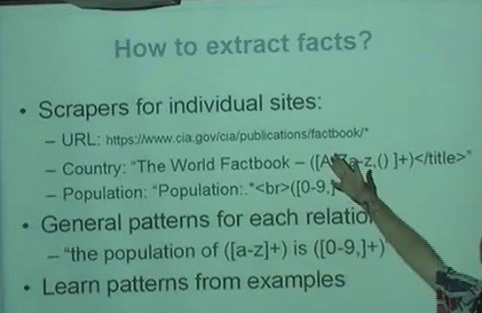
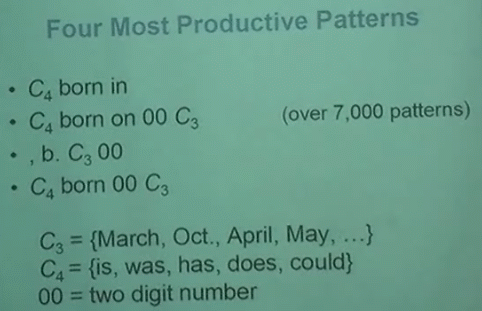
Peter Norvig gave a talk at UC Berkeley on September 25. Among other things, he talked about some Google projects that use artificial intelligence. He also said that a large corpus of data can be much more valuable than an efficient algorithm. One example of project where Google uses a lot of data is Google Q&A, that is extracting facts from web pages and delivering as answers to common questions like "what is the population of Japan?". Google doesn't use predefined patterns, they find the patterns from examples, as this approach is more scalable. They extract data by matching the patterns against the top results for a query.


The presentation is available online (MMS stream).

Asking the Internet

Yahoo is very proud of Yahoo Answers, a service that allows you to ask questions and get answers. Unlike Google Answers, asking questions is free. Yahoo has integrated Answers into the search page and expanded the service globally. The growth of the service is impressive.

"The popularity of web search has changed the way we think about the Internet in some pretty odd ways. I've heard more than a few people struggling to answer a question who turn to their keyboard and proclaim, "I'll just ask the Internet" while typing something into a search box.

Amazingly, that works in a lot of cases. When it comes to locating facts, such as the capital of India, web search rocks. But there are many times that keywords just don't cut it—times when you need to ask a question to a group of humans. You know, real people."

This is how Jeremy Zawodny explained one year ago the need for Yahoo Answers. Computers can't answer complicated questions, so why not let other people answer them? Google's idea was to hire professional researchers that received money for answering questions.

So let's compare the answers for a complicated question like: "How to speed up my computer?"

In Google Answers, the researcher writes a long answer and explains step by step how to remove unneeded applications, download an anti-virus and defragment the hard-drive. All for only $2.

The best answer from Yahoo is more simple: "Defragment it. Get rid of viruses. Clean out your temporary internet files. Add more memory (expensive but it might help)."

So both answers are OK, but while Google's researchers give more detailed answers, Yahoo uses the advantage of having a strong community.

Another site, called ChaCha, wants to become the next big search engine, by integrating a live chat with experts that will help you find information on the Internet.

"The value of a service like ChaCha lies in its ability to connect users immediately to a knowledgeable guide, who has experience or background a particular field. Think of it as calling 411 directory assistance on the Web.

Users will connect to a live guide via instant messenger from the ChaCha home page. After a connection is made, within 1 minute or less, the user can ask all kinds of questions of their guides until they get the information they need. The guides, who are organized by their areas of knowledge, will pass on information and Web site addresses that will appear on the user's screen," reports San Francisco Chronicle.

ChaCha is still in alpha, but the idea is interesting. ChaCha wants to combine the experts from Google Answers with a free and fun service like Yahoo Answers. We'll see if 3,000 guides can be enough for the demands of a big audience, but one key feature will make people visit the site: you'll get your answer now.

So, while search engines and encyclopedias are a good way to find answers to simple questions, people want real solutions for their concrete problems. Using other people is a good solution for the moment, but a site that mines the web, libraries and other resources might be a better and more scalable idea. Especially if the site knows something about you.

Google Uses Community To Improve Search Results

At Google Press Day, Marissa Mayer launched four products:

* two are available online: Google Trends, Google Desktop 4.0

* two will be available soon:

- Google Notebook will be a little window similar to Gmail Chat window where you can drag-and-drop content from sites. It's like the "Blog This!" button on Google Toolbar, but you don't store the content on your blog - you store it on your Google Account. Google Notebook will be available next week at http://google.com/notebook.
Google Notebook is a simple way for users to save and organize their thoughts when conducting research online. This personal browser tool permits users to clip text, images, and links from the pages they're browsing, save them to an online "notebook" that is accessible from any computer, and share them with others.

Google Notebook is an interactive scratch pad for every website a user visits, offering a single online location to collect web findings without having to leave the browser window. For example, if a user were planning a vacation, she could clip the most relevant materials on the pages she visits and add personal notes to help organize all of her research.

Users can make their Google Notebook public and share the notes they've taken with others. As a result, the time and effort put into their research can be harnessed by the online community as a whole.


- Google Cooperation lets you associate tags with web pages.

Google Co-op beta is a community where users can contribute their knowledge and expertise to improve Google search for everyone. Organizations, businesses, or individuals can label web pages relevant to their areas of expertise or create specialized links to which users can subscribe.

Once a user has subscribed to a provider's content, all of that provider's labels and subscribed links are added to the user's search results for relevant queries. These contributions serve as meta information that helps Google's search algorithms connect users to the most relevant information for their specific query.

For example, a doctor can label web pages related to arthritis, and users who subscribe to that doctor's information will receive options at the top of the results for more specific information such as "treatment," "symptoms," or "for health professionals" when they enter a relevant query.

Related:
You can see a screenshot for Google Cooperation that explores the medical vertical (hyped as Google Health)
Google Notebook review
Related Posts Plugin for WordPress, Blogger...