Showing posts with label Web History. Show all posts

Google Instant Brings Back Search History Suggestions

One of the most useful Google Suggest features missing from Google Instant was the Web History integration. Google Suggest used to show a list of previously typed searches if you were logged in to a Google account, so you could quickly select the query without having to type it again.

This feature is back in Google Instant and it hasn't changed too much. You'll still see up to 3 suggestions from your Web History, but the "Remove" link is more visible and personalized suggestions have a different color.


Unfortunately, Google's implementation is not great because it shows too many suggestions from your Web History and your previously typed searches are very likely to become predictions. For example, if you've searched for [Microsoft Tellme] two days ago and you now start to type "micros", Google will display the results for [Microsoft Tellme].

Web History Suggestions in Google Instant

There are many missing features in Google Instant. The classic interface suggested searches from the Web History, so you could select previously typed queries.

It seems that this feature will be available again. Google tests a version of Google Instant with Web History suggestions. For some queries, 3 of the 4 suggestions are from the Web History and there's only one general suggestion.


Maybe it would be a better idea to only show one or two personalized suggestions, since they aren't always useful.

Mobile Google History and Bookmarks

Google added a link to a mobile version of Google Web History at the bottom of the homepage for iPhone and Android users. The mobile Web History lists the most recent searches, the search results you've clicked on and your bookmarks. You can also remove some of your searches.

There are many missing features: you can't search the history, you can't restrict the queries to image search or Google Maps, you can't search your bookmarks or find bookmarks that have a certain label. Google only shows the most recent 10 bookmarks, which seems an arbitrary limitation. The most interesting feature that's not available in the desktop interface is showing thumbnails next to each web page.

"If you've enabled search history in your account (tap 'Settings' and select 'Save Searches' under 'Search History', then tap 'Save'), the history that you see is a combination of all your searches done while you are signed-in, whether you are searching from a laptop at home, your desktop computer at work, or your phone while on-the-go. Your mobile searches are marked with a little phone icon so you can tell them apart. For websites you've visited while searching on a desktop or laptop, you'll see screenshot thumbnails that can help you recognize and return to the right sites quickly," explains Google.


A quicker way to see your most recent searches is to click on the search box from Google's homepage.


If you don't have an iPhone or an Android phone, here are the links to Google's mobile site: http://www.google.com/m/gp and the mobile Web History: https://www.google.com/m/history?action=gethist.

Why Google Web History Is Enabled by Default

When you create a Google Account, the option to store all your queries and the search results you click on is enabled by default. Google Web History keeps track of all your Google searches and associates them with your account so that Google can personalize search results.


Jonathan McPhie, Product Manager at Google, explains why Google Web History is enabled by default:
We've found that it is difficult to articulate the usefulness of having Web History turned on without trying it out for yourself. This is because the changes are subtle and vary from person to person. Having this feature on by default allows users to enjoy the benefits of personalized search without going out of their way to turn it on. And this option is one of only two that we show when signing up for a new account (the other is "stay signed in"), so we feel like it has a fair amount of prominence in the process.

Google Web History can be temporarily paused or even removed from your Google Account. Initially, Google Personalized Search was an optional feature and users had to manually enable it. Now Google personalizes search results even for users that aren't logged in. If you're not signed in, Google personalizes search results using "up to 180 days of signed-out search activity linked to your browser's cookie, including queries and results you click."

Google Shows Suggestions from Your Search History

When you create a Google account, Google enables an option that saves all your queries and the results you clicked on. The service is called Web History and it can be extended to all the web pages you visit if you install Google Toolbar.

Web History has many uses, but Google has barely scratched the surface by offering some basic recommendations and trends. Google decided to personalize the suggestions offered when you type a query on Google's homepage by adding searches from your history. Like in Firefox's search box, the historical queries are displayed at the top, but the major difference is that Firefox saves the searches on your computer, while Google saves them in your account.

In the screenshot below, you can see the suggestions provided by Google after typing [gm] in the search box: there are 5 suggestions from my search history (all related to Gmail) and 5 popular queries from Google Suggest.


Google doesn't provide a way to disable the suggestions from your search history, so your options are to log out, disable query suggestions from the preferences page or delete the web history.

Update: I don't see this feature in all my accounts, so it's not available to everyone.

How Many Times Have You Searched Google?

While it's difficult to estimate your number of searches, Google Web History shows the total number of searches performed when you were logged in. The service was launched in April 2005, but my account shows data from December 2005.

Google Web History is enabled by default when you create a Google account and it records your searches, the search results you click on and your browsing history, but the last feature is opt-in.


In 2003, Google tested a counter that displayed the number of searches, but that feature didn't go live. "The counter is displayed at the bottom of Google's home page, and shows both a numeric count and a color bar to represent the frequency of your searching. (...) Beyond being an interesting gimmick, what's the purpose of the counter? Though Google has removed the counter FAQ page, its answer to the question What do I win was the zen-like There is no winning. There is only self-awareness. The search is endless."

Use Google Web History Without Installing Google Toolbar


If you want to use Google Web History and save your browser's history on Google's servers, you generally need to go to this page and select "Enable Web History and install the toolbar". This procedure installs Google Toolbar, a plug-in available only for Internet Explorer and Firefox, and enables the PageRank feature, which displays the ranking of any site you visit while sending the URL to Google in the process.

If you use another browser or if you don't like Google Toolbar, there's an alternative way to send all the web pages you visit to Google: a script that asks Google for the PageRank of any web pages you load in your browser. To install the script you need:

* Greasemonkey, an extension for Firefox. Make sure to restart the browser before trying to add the script.
* Trixie, one of the best Greasemonkey-like plug-ins for Internet Explorer
* SIMBL and GreaseKit for Safari
* no additional software for Opera, but you need to enable the feature from Opera's interface
* Konqueror Userscript for Konqueror

The script is taken from this site, that also adapted it from other scripts. I mirrored the script to an easily-accessible location.

Once you've added the script, you only need to enable Google Web History: go to this page and select "Enable Web History and install the toolbar", but cancel the downloading process (you don't need the toolbar).

This feature only works when you're logged in to your Google Account. To disable it, remove the script from Greasemonkey or from another plug-in you've installed.

Blog Search, Included in Google History

Google Blog Search is now a part of your search history. That means every time you use the specialized search engine for blogs and you're logged in, your query is associated with your account and made available in the Google History interface. You can browse the list of queries and find a web page you visited in the past, but only if it was a Google search result. To augment Google History with all the web pages you visit, you need to install Google Toolbar and enable this option.

The History of Your Book Searches

Google Web History is more useful starting from today because it has support for a new Google service: Book Search. All your queries, all the books you've opened and a list of the pages you've read are available, sorted chronologically. You can also search the books, but only the title is searchable, which is rather weird.

Web History is a service that lets you "view and search across web pages you've visited in the past". The standard version only logs your Google queries and the associated search results you click on, but if you enable web history, Google can track all the pages you visit. This makes your web history persistent (browsers usually keep your history for about 7 days), fully searchable and always available.

Google Web History

Last month I wrote a post titled Web history, the next step in Google's personalization (I quote myself):
Google's plans for using personalization to improve search results could face some difficulties. Google already uses your queries, the results you click on, your bookmarks, but this isn't enough to build a comprehensive profile. People don't search too many times and, most often, they click on the top search results.

So I think the next step in Google's efforts to tailor the search results to your preferences is to expand the search history into something more complex: the web history. Browsing web pages is an important part of your online activity and there are already applications like Google Desktop that monitor and index the visited web pages.

Google Web History is a reality starting today. This replaces the previous search history service that was limited only to queries and search results. If you want to add the web pages you visit, you need to have Google Toolbar with the PageRank feature activated and to enable web history here. It's just the regular toolbar, but you'll have to explicitly allow Google to use the PageRank feature to record all the visited web pages and associate them with your Google Account.

The listing mixes visited web pages with Google searches, as you can see in the screenshot below:


"You know that great web site you saw online and now can't find? From now on, you can. With Web History, you can view and search across the full text of the pages you've visited, including Google searches, web pages, images, videos and news stories."

Besides keeping track of all the web pages you visit and making them searchable online, Google Web History is used to improve the personalized search results.

"Web History uses the information from your web history or other information you provide us to improve your Google search experience, such as improving the quality of your search results and providing recommendations."

Google says they encrypt all the data and you're the only one who can access it (they even ask your password multiple times during a session). Web history is a feature implemented in most modern browsers, but the storage is limited and the history is usually deleted after a small number of days. Google's new feature lets you store your entire web history online (and that sounds pretty scary).

Of course, you can pause the service at any time and even delete the entire web history, but the big question is: do you trust Google enough to send it all your online activity?

Related:
Personalized Google
MyLifeBits - Making your life searchable

Web History, the Next Step in Personalized Search?

"With infinite storage, we can house all user files, including: emails, web history, pictures, bookmarks, etc and make it accessible from anywhere (any device, any platform, etc)." (From a Google presentation)

Google's plans for using personalization to improve search results could face some difficulties. Google already uses your queries, the results you click on, your bookmarks, but this isn't enough to build a comprehensive profile. People don't search too many times and, most often, they click on the top search results.

So I think the next step in Google's efforts to tailor the search results to your preferences is to expand the search history into something more complex: the web history. Browsing web pages is an important part of your online activity and there are already applications like Google Desktop that monitor and index the visited web pages.

A web history service could be easily implemented in the toolbar. If you enable PageRank in Google Toolbar, you send each page you visit to Google, but they are logged anonymously. Now these web pages would be connected to a Google account. Unlike the solution implemented in Google Desktop, this service would use the information from Google's index and wouldn't need local storage. It would also extend the history feature from most browsers, which is severely limited in time.

You'll be able to tell if you visited a page in the past, how many times and what was the context. Some clever algorithms could extract patterns and could recommend you similar pages you wouldn't have discovered otherwise.

Of course, a such a service would cause a big debate regarding privacy and trust, so it will be disabled by default.

Google says in a patent application filed last year: "Search engines typically provide a source of indexed documents from the Internet (or an intranet) that can be rapidly scanned in response to a search query submitted by a user. As the number of documents accessible via the Internet grows, the number of documents that match a particular query may also increase. However, not every document matching the query is likely to be equally important from the user's perspective. (...) Over time, a user will have executed a history of search queries, results which were examined, advertisements that were clicked on, and other various browsing activities which reflect the user's preferences and interests. Oftentimes a user may be interested in examining the user's such prior activities. It would be desirable to permit the user to use the prior activities to enhance the user's searching and browsing experience."

Sponsored Links Added to Google Search History

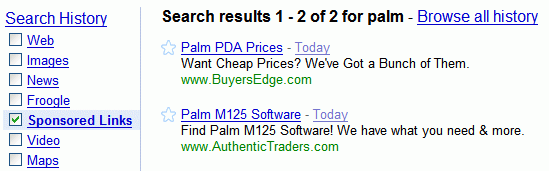
Now you can search and manage all the sponsored links you've clicked on Google's search results pages. Google Search History added a new section for Google ads, in the growing list of services available in this interface. This might be useful if you want to buy something, but you want to check other sites before actually ordering the product: you come back to the search history and have the links there.

Google also has a search engine that only shows sponsored links. Just in case you get bored with the actual search results.


Related:
Making use of Google Search History

Making Use of Google Search History

Google Search History records the queries and the search results you've clicked on. How would you use this service?

1. Search History Trends shows you statistical information about your Google searches. For example, you can monitor your daily search activity or see how often you've used Google in July.

2. Google Recommendations is a gadget for your personalized homepage that lists searches, web pages, gadgets, and videos recommended for you, based on your previous searches.

3. Browse the Search History and bookmark interesting sites. Just click on the small star next to the search result.

4. Find how often you search for something.

5. If you know you found a site using a Google search, you can use the Search History to find it again. It's easier because the scope is limited.

6. Use the calendar from Google Search History to see what searches you performed on a certain day. It's like going back in time.

7. How many times did you visit a site from Google search and when was the last time? Enter the address in the search box and you'll see the answers next to the title.


8. Grab a feed that contains your latest Google queries: https://www.google.com/searchhistory/?output=rss. Note that your feed reader needs to support SSL.

9. If you search for sensitive information or you don't want to include certain queries in Search History, either pause Search History, or remove the sensitive queries and search results.

10. Google Desktop extends the concept of search history to all the websites you visited using your browser. You are able to search it only from your computer by default or from other computers if you enable Search Across Computers.

Google Maps in Search History

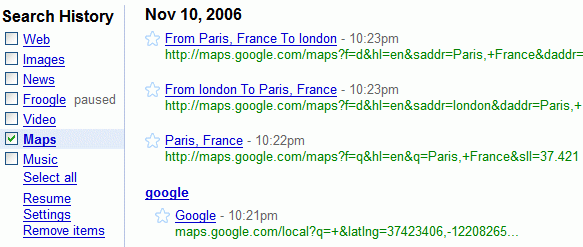
Google Maps is now included in Search History, so you can access all your searches, even if you try to find a location, a business or just directions. Search History also saves the search results you've clicked on.

Search History was launched in April 2005 and grew from web search to image search (July 2005), news (November 2005), Froogle (February 2006), Google Video (June 2006) and the music you listen (August 2006). Search History is automatically enabled if you activate Google's Personalized Search and can be accessed by clicking on "Search History", next to your Google username.

You can think at Search History as a persistent memory that can help you search over your past searches.

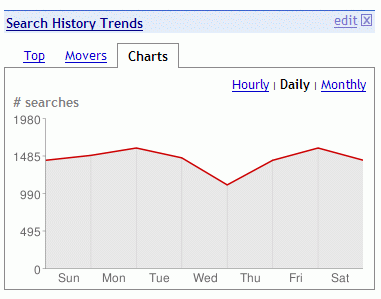
Search History Trends

Chart of daily search activity
There's a new module for Google Personalized Homepage - Search History Trends that shows the same information you could've find in the Trends section of Search History, but it's more accessible. What you can see: top searches, most visited sites (from Google searches), top gaining queries related to your searches, your daily search activity.

This module it's useful because it allows you to visit your favorite sites or search your favorite queries without looking in your huge list of bookmarks. And you can find what's new in your community just by looking at the related searches.

The trends are also available for the last week, last month and last year. A chart that shows the trends for each query would be a nice addition.

Related:
Google Trends competition
Google uses community to improve the quality of search

Google Video History and Favorites


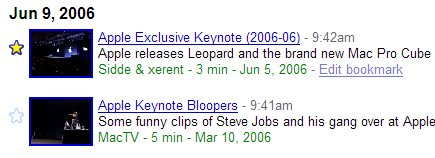
Google saves links to the videos watched at Google Video to Google Search History. So the next time you want to find the video about Apple you watched last week you can search your Google History. If you are there, you can bookmark the video with Google Bookmarks.

Another new feature is Movers & Shakers. If you don't know the meaninig of the idiom, it's "one who wields power and influence in a sphere of activity". Google groups videos that are most influential in a restricted territory. You can see the moves & shakers in a country (for example, US).
Related Posts Plugin for WordPress, Blogger...