Showing posts with label Google Talk. Show all posts

Google Talk and AIM to Become Interoperable

When you log in to your AIM account in Gmail, you get a message from AOL that links to this page.


In the next few days, Google and AOL are working together to change the way you connect to AIM buddies within Gmail. After this change, Gmail and AIM users can talk directly to each other without having to log into both services (you will no longer be able to log into AIM within Gmail's "Chat" section).

It's nice to know that AIM and Gmail Chat (Google Talk) will finally become interoperable and the Gmail integration will no longer be necessary. Back in 2005, Google and AOL announced that "Google Talk users and AIM users will be able to communicate with one another" and two years later Gmail Chat integrated with AIM, but they didn't become interoperable.

{ Thanks, Josh. }

Google Talk Guru

Google Talk Guru is a new Google bot that lets you ask simple questions. It's "an experimental service that allows people to get information like sports results, weather forecasts, definitions etc via chat. It works on many popular chat applications that support Google Talk."

Send an invitation to guru@googlelabs.com in Gmail Chat, Google Talk or any other Jabber client and find simple facts like "weather in London", "amplitude definition", "translate souris", "2^8", "web stanford" (which returns the top Google result for [stanford]).


The service is not as powerful as Google SMS, but it's still handy.

{ Thanks, Michael. }

Gmail Voice and Video Chat for Linux

After two years of waiting, Gmail's plug-in for voice and video chat is finally available for Linux users. "Voice and video chat for Linux supports Ubuntu and other Debian-based Linux distributions, and RPM support will be coming soon," says Tristan Schmelcher, from Google.


Justin Uberti says that adding Linux support was really difficult. "This release required significant engineering to develop an all-new video rendering solution and an all-new PulseAudio-based audio handler, along with work to support 64-bit and countless webcam compatibility tests. We spent a lot of effort to make it fully feature-complete, with all the same goodies as the Windows and Mac versions, and we're happy to now support Google voice and video now on all major desktop platforms."

Now that video chat is available on Windows, Mac and Linux, when will it be ported to Android?

Friend Suggestions in Google Chat

The Google Chat gadget from iGoogle's sidebar started to show friend suggestions and they're usually people you've emailed frequently. Google also shows a list of Google Translate bots that help you translate the messages from a conversation.


Another new feature lets you send some of your contacts to someone you've emailed frequently.


It seems that the suggestions are displayed even if you've enabled this option in Gmail: "Only allow people that I've explicitly approved to chat with me and see when I'm online". By default, Gmail automatically invites to Google Chat the users whom you frequently email. "Gmail determines which contacts you'll be able to talk to without having to invite each other."

{ Thanks, Bogdan. }

Send Files in Google Chat

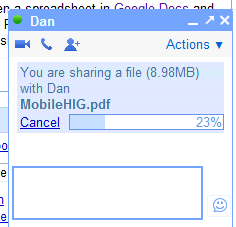
One of the few features that are available in Google Talk's desktop client, but couldn't be used in the web-based gadgets from Gmail, iGoogle and orkut, is file sharing. The missing feature is now available in iGoogle and orkut, but not yet in Gmail.

"Starting today, you can share photos, documents, and other files while chatting in iGoogle and orkut. To give it a try, just click Send a file... in the Actions menu while chatting with a friend (no download required). This feature is also compatible with the file transfer functionality in the Google Talk downloadable software, so you can share files directly from the web with folks who use the desktop version," explains Google.

You can send multiple files at the same time, but you can't select multiple files from the file picker dialog. Google Chat doesn't support transferring files larger than 100 MB.


Google Talk's desktop client is no longer updated, as Google focused on improving the chat feature from Gmail and adding similar features to iGoogle and orkut. Google Talk's homepage still links to the Windows client, but the first option is a plug-in for video chat.

{ Thanks, Niranjan. }

Google Talk to Add Video Conferencing

Gmail Chat, the web-based version of Google Talk, added last year voice and video chat. The feature is now available in iGoogle and orkut, but it will probably be added to other Google services, as well.

SFGate reports that Google will improve the service significantly in the coming months.
Gmail's voice and video chats are now limited to one-to-one communications, but Google wants to broaden that capability to more than two participants and make it more robust all around for Apps.

"This [current Gmail capability] is the first step in a much broader set of features we hope to roll out over the next six to 12 months around video [and voice] chat capabilities," said Rishi Chandra, a Google Apps product manager. "It's a great opportunity for us to push that space along."

It's not clear whether Google plans to integrate Marratech's video conferencing software, acquired in 2007.

Other features that will be added to Google's services: "intelligent meeting scheduling in Google calendar", "intelligent workflow in the [Google Docs] applications", "lots of new functionality being developed especially around formatting" in Google Docs.

{ via Justin Uberti }

Gmail, Google Calendar, Google Docs Come out of Beta

Google changed the meaning of "beta software" by launching applications in early stages and forgetting to remove the word "beta" even after years of testing. Gmail has been launched in April 2004 and it's still in beta after more than 7 years of development.

New York Times reports that Gmail, Google Calendar, Google Docs and Google Talk are coming out of beta today. Google hopes to convince businesses that the applications are good enough to be used in a corporate environment. "For business customers, it is an important sign in terms of the maturity of our product offering and commitment to this business. I've had C.I.O.s tell me that they would not consider a product labeled beta," explained a Google employee.

What's in a name? Apparently, not much, since Gmail's perpetual beta only meant that there are still significant features that need to be added. "We have very, very high standards for the product, as we do for all Google products. But we are not ready to come out of beta yet. There are a few things that we're working on, and once we meet a couple more of those criteria, we would love to come out of beta," said Gmail's Product Manager Todd Jackson in March.

Making labels more familiar was probably one of the things that had to be changed before Gmail could finally be good enough to drop the "beta" tag. Keith Coleman, Gmail Product Director, has a longer list of features that had to be added: integrated chat, mobile versions, open protocols, better anti-spam technology, a more flexible architecture.

"Some people think we should wait until we launch < one of ongoing secret projects >. Others say that, over the last five years, a beta culture has grown around web apps, such that the very meaning of "beta" is debatable. And rather than the packaged, stagnant software of decades past, we're moving to a world of rapid developmental cycles where products like Gmail continue to change indefinitely."

Update: If you think there's something missing from Gmail's logo, enable the "Back to Beta" feature from Gmail Labs to bring back the familiar logo. It's that easy to pretend that nothing happened.

Play Games in Google Talk

Google released a realtime gadgets API for Google Talk that's especially useful if you want to play games with your friends.

"gadgets.realtime and the APIs built on top of it allow gadget developers to write applications that communicate asynchronously with another endpoint, whether that endpoint is another instance of the application (on another machine, or in another browser, for example), the container hosting the gadget, or an application hosted in the cloud. The obvious application of these APIs is 1:1 gaming -- at its most basic a Tic-Tac-Toe game between two users. However there are many other more complex (and arguably -- depending on your thoughts about games -- more interesting) scenarios that these APIs enable; for instance, a chat application that translates text as participants type it, or a shared whiteboard, or an application that lets a couple choose the best flight for their upcoming vacation."

For now, the APIs are only available in a developer sandbox, which includes a special interface of Gmail Chat. Here's how you can play chess with one of your friends:

* Go to the sandbox and send this link to your friend: http://talkgadget.google.com/talkgadget/sandbox .

* When your friend started to use Gmail Chat's sandbox, click on "Options", select "Start application", paste the following address:
http://code.google.com/apis/talk/examples/chess.xml
and press Enter.


If you don't know how to play chess, try two other applications:

* a very simple rock-paper-scissors game:
http://code.google.com/apis/talk/examples/rps.xml

* an automatic translation application:
http://code.google.com/apis/talk/examples/interpreter.xml

{ via Google Talk Blog. Thanks, Niranjan. }

Comparison of Google Talk's Official Clients

Google has way too many separate implementations of Google Talk and very few features are available in all clients:


Features / implementations
Google Talk
Gadget
Labs Edition
Gmail Chat
iGoogle and orkut iPhone version
Requires installing software
Yes (Windows)
Flash plug-in
Yes (Windows)
No (some features require plug-ins)
No
No
Tabs
No
Yes
Yes
No
No
No
Themes
Yes
No
No
Yes
Yes
No
Gmail notifications
Yes
No
Yes
No
No
No
Calendar notifications
No
No
Yes
No
No
No
Invisible status
No
Yes
Yes
Yes
Yes
Yes
Music track status
Yes
No
No
No
No
No
Text chat
Yes
Yes
Yes
Yes
Yes
Yes
Multi-user chat
No
Yes
Yes
Yes
No
No
Features / implementations
Google Talk
Gadget
Labs Edition
Gmail Chat
iGoogle and orkut iPhone version
Copy the text of a message
Yes
No
No
Yes
Yes
No
Saving messages to Gmail
Yes
Yes
Yes
Yes
Yes
Yes
Audio chat
Yes
No
No
Yes
No
No
Voicemail
Yes
No
No
No
No
No
Video chat
No
No
No
Yes
No
No
Send SMS
No
No
No
Yes
No
No
AIM integration
No
No
No
Yes
No
No
File transfer
Yes
No
No
No
No
No
View photos (Flickr, Picasa Web)
No
Yes
Yes
No
No
No
Play videos (YouTube, Google Video)
No
Yes
Yes
Yes
No
No

You can also use any other client that supports Jabber, but most of the features above won't be available.

Google Chat in iGoogle and orkut

Google started to integrate a Gmail Chat widget in iGoogle's much-hated navigation sidebar. The page will load even slower and people will have one more reason to complain. If you don't like the chat box, Google recommends to sign out of chat, although you could also change your status to "invisible".

Another thing you'll notice in all versions of iGoogle is the integration of Google Suggest in the search box. As usually, this can be disabled in the preferences page by selecting "Do not provide query suggestions in the search box".

Preparing to become a full-fledged social site, iGoogle added a contact manager to the settings page so you can separate your contacts and view their profiles.


If these new features aren't yet enabled in your account, visit http://www.google.com/ig/v2invite to add them. For those who hate everything about the new iGoogle, from the unfinished Gmail gadget to the big sidebar and the annoying bug that displays the canvas view of the most recently opened gadget when you open iGoogle, there's an address that shows the old version of iGoogle: http://www.google.com/ig?gl=all.

orkut, the other social network owned by Google, continues to add last season's Facebook features, now cleverly integrating Gmail Chat. "To get you started, we've come up with a formula that automatically predicts which of your orkut friends you probably want to chat with, and only tells those people that you're signed into Google Talk. Our formula takes a bunch of things into consideration, giving preference to people who you've labeled as 'best friends' or written scraps to recently, and people who have friends in common with you."

In addition to showing Google Talk contacts, orkut will also add some friends you are likely to chat with. Like iGoogle's sidebar chat, orkut's chat boxes are persistent so you can visit different orkut pages while continuing to chat.

The new orkut feature will be rolled out in the next weeks to orkut's huge userbase, so it's likely that you won't see it right away.


{ Thanks, Edam. }

Is a Google Talk Contact Invisible?

Sometimes error messages can reveal more than they were supposed to. Rahul Bansal writes about a simple trick that helps you find out if one of your Google Talk contacts is offline or uses the invisible mode. The trick takes advantage of Google's off the record feature which lets you chat with your contacts without saving the conversations in Gmail.

"Chats that have been taken off the record aren't stored in your Gmail chat history, or in the Gmail chat history of your contact. You and the person you're talking to can both see when a chat is taken off the record, and you'll be notified if off the record mode is disabled. Your off the record settings will apply whenever you chat with this person, until one of you makes a change."

Let's say you want to know if your co-worker Michael is really offline. If you start a chat when he is online and select "go off the record", none of your messages will be saved in Michael's Gmail account. That means the next time Michael appears to be offline and you send a message, there are three possibilities:

1. Michael is offline or he has blocked you: Google will display the error "Michael did not receive your chat" (Gmail Chat) or "Michael may not have received your message" (Google Talk gadget). Offline messages are sent as regular messages in Gmail, but this is not possible because the conversations between you and Michael are off the record. Michael won't receive your message.

2. Michael is invisible: you won't see any error, but Michael will receive your message.

Michael is "invisible"

Michael is now offline

"Now the only tricky part is finding a user online for once to set chat off the records. This doesn't seem hard as invisible status is still limited to Gmail version of Google Talk and you may be in luck if your friend uses Google Talk desktop clients/gadgets or third party IM client to chat," concludes Rahul. It's important to note that the invisible status is available in Gmail Chat, Google Talk gadget, Google Talk Labs Edition and Google Talk for iPhone, not just in Gmail Chat. Of course, your contact can always disable the "off the record" setting or block you.

Google Talk for iPhone

Google has finally launched a mobile version of Google Talk, but it's optimized for iPhone's browser. You can access if you go to google.com/talk on an iPhone/iPod Touch or using this permalink: http://talkgadget.google.com/talkgadget/m (shorter URL: http://tinyurl.com/4vnfcd).


This Ajax version is based on Google Talk's Flash gadget, but it doesn't include tabs, group chat, options to add contacts and send email. What you can do is to update your status, search your contacts and chat with people that are online.

Besides this mobile interface, Google also has a mobile app for Blackberry. That means if you don't have a Blackberry, an iPhone or at least a WebKit mobile browser, you have to find a third-party service.

eBuddy is a service that offers both a basic mobile interface for Google Talk and a mobile application that lets you chat faster with your friends. eBuddy doesn't connect only to Google Talk, it's a multi-network IM client that works with MSN, Yahoo and AIM. Unfortunately, I couldn't find any information regarding the way eBuddy stores or uses your credentials and seeing that eBuddy sends the password in plain text is worrisome.

Another mobile application that lets you chat with your Google Talk contacts is Fring, but it only works on Symbian and Windows Mobile devices. As usually, make sure you trust the service before entering the username and password of a Google account.

Google Talk Adds Invisible Status

Some Google applications need a lot of time to add even the most basic features. Gmail Chat added the invisible status in February and now this feature is also available in the Google Talk gadget and in Google Talk Labs Edition. Don't ask about the classic Google Talk client, which was last updated in January 2007.


In a previous post, many people argued that it's not wise to add the invisible status because the instant messaging becomes less useful as more people become "invisible". "It's like one-way spying. If you're going to be online to see if your friends are online, at least have the respect to show other people that you're online. What happens if both you and your friend want to talk to each other, but are both on invisible? You'll never discover that you're online," commented Jyvyn.

One solution for this problem could be to show different statuses, depending on your contacts. "What would be most helpful would be some sort of 'group block' or 'group invisible'. I have a number of work contacts that use g-chat so I need to be on and available, but often I am interrupted by friends wanting to chat and I have to ignore them or interrupt my work to explain I can't talk. If I could add all my work contacts to a group, and show my status to them as online, while showing everyone else away, invisible, or even offline - now that would be useful," said nauthiz693.

Integrating Gmail's contact groups with Google Talk is an obvious next step, but this might require many months of coding. After all, adding the invisible status is probably the second most notable feature added by Google Talk this year, after the chatback badges.

{ Thanks, Carlos. }

Display Google Talk Presence

If you wanted to post your Google Talk ID on a site and display an icon that shows your status, it's quite easy. Google offers a chatback feature for anonymous conversations with the visitors of a site and this feature has been recently updated with more ways to display the badge.

To get your presence icon, go to the badge generation page, select "Hyperlink and status icon (no frame)" from the list of styles, click on "Update badge" and copy the code in a text editor. You should identify a URL that looks like this (the bold part could be removed to simplify the address):

http://www.google.com/talk/service/badge/Show?
tk=LIST_OF_CHARACTERS&amp;w=9&amp;h=9

This image could be displayed next to your Google Talk username to show whether you are available for chat. Obviously, if you like the chatback feature, you could add the entire code generated by Google.

More Synergy Between Google's Communication Services

Google Talk has four flavors (Google Talk, Gmail Chat, Google Talk Gadget and Google Talk Labs Edition) and all of them have different features: you can transfer files only in Google Talk, chat with AIM contacts only in Gmail, get calendar notifications only in Google Talk Labs Edition and upload pictures from webcam only in the gadget. It's quite confusing to switch between all these implementations of the same service. Apparently, the main reason behind the launch of Google Talk Labs Edition was to unify these versions in a common platform. Here's a recent post from Ollie, Google Talk Guide:
We certainly haven't forgotten about our client users and we've been listening to your comments (here, in the Google Talk Help Discussion Group, and on the feedback forms). We hear you loud and clear; you love the client and you want it to have all the great new features that have been added to Gmail Chat or the Google Talk Gadget. We know that it's important to be able to chat inside and outside of your browser and that it's important to have a full array of features at your fingertips in both places. In short, you want to be able to choose how to connect to the Google Talk service without having to make any major feature trade-offs. We're completely with you on this one -- we want that too!

Now, I suspect some of you are thinking: if you're with us on that, why aren't all features available on the client right now? Well, we've got a lot on our plate here at Google Talk and we're always negotiating what we can get done. At the moment, we're focusing our energy on developing platforms that will let us make Google Talk better for all our users, whether they want a web-based experience or a client experience. There is still much to done, but we're committed to continually improving the Google Talk user experience for everyone.

As Jeff suggested in the comments, all these delayed Google Talk updates could be caused by a future integration with GrandCentral. "Although you haven't heard as much from us in the past few months as you did before, we are working hard every day on the next great version of GrandCentral and a ton of cool new features," informs up a post from GrandCentral Blog.

{ Thank you, Ender. }

Google Talk, Labs Edition

There's a new flavor of Google Talk: the Labs edition, a desktop client that looks very similar to the Google Talk gadget and has most of its features. The application doesn't support voice chat or file transfer, it's still Windows-only, but it has some new features: it lets you launch Google Calendar and Orkut, while including notifications for Google Calendar events and Orkut scraps. The new Google Talk uses WebKit to render some parts of the interface.

I don't find too many reasons why someone would switch from the full-featured client to the Labs edition: group chats, smilies, tabs, while the missing features are more important. A better decisions would have been to integrate these new features in the desktop client, instead of releasing a separate application. Now we have four different flavors of Google Talk: the original client, Gmail Chat, the gadget and the Labs edition.


{ Thanks, ebass5str . }

Google Talk, Not Dead After All

14 months ago, when Google added Vista support for its instant messaging client, nobody anticipated a long period with no updates. According to a Google engineer, the desktop client hasn't been abandoned and we should expect a completely new version of Google Talk. While I couldn't find when it will be released or the new features, it's reassuring to hear that Google is still working on GTalk.

Some of the most popular features requested by users are already available in the online interfaces: group chats, invisible mode, AIM integration, so we should expect to find them in a new release of Google Talk. Other features are already standard in other IM clients: video conferencing, conference calls, phone calls.

Last year, a presentation for Google Apps inadvertently included a screenshot of Google Talk enhanced with the ability to make phone calls. In the comments, someone informed us that "internally at Google, this feature is already active since long".


What would you like to see in this all-new version of Google Talk?

Chat With Your Site's Visitors Using Google Talk

Google Talk's gadget was a nice addition, but you couldn't use it to chat with unknown people or with the visitors of the site, like in Meebo Me. Now you can do that using the new chatback badges. You only need to add some code to your site and anyone could click on the generated badge to chat with you.


"A Google Talk chatback badge allows others to chat with you even if they haven't signed up for Google Talk or a Google Account. You can put the badge in your blog or website, and people who visit those pages can chat with you. The badge will display your online status (whether you're available to chat or not) and, optionally, your status message."

If someone clicks on the badge, a special version of the Google Talk gadget will open and he will be able to chat with you.


The conversations are private and only one-to-one, so other visitors won't be able to read them. For some strange reason, they're not even added in Gmail's chat section. Unfortunately, being constantly interrupted by other people is not very pleasant, so you can disable the link from your badge by setting your status to "busy" or by signing out of Google Talk.


{ Thank you, Dan. }

Invisible Mode in Gmail Chat

Gmail Chat added a new status option: invisible. Now you can be logged in to Gmail Chat and see if your contacts are online, but they won't be able to see you're online.


If you simultaneously use Gmail Chat and any other flavor of Google Talk (the gadget or the desktop application), you won't be able to change your status to invisible because they don't support the new feature yet. The feature was first added to Gmail Chat because it's the most used interface for Google Talk, but it's unpardonable to have three separate interfaces with different features.


Note that feature is only available in the new version of Gmail, supported in Internet Explorer 7 and Firefox 2. I wonder if less people will disable Gmail Chat or the feature will become less useful.

{ via Blogoscoped Forum }

Who Are My Gmail Contacts?


Google has an awkward way of dealing with contacts in its communication apps. In Gmail, your contact list includes all the people you've ever replied, but you can also add other contacts manually.

"Email addresses are automatically added to your Contacts list each time you use the Reply, Reply to all, or Forward functions to send messages to addresses not previously stored in your Contacts list," according to the help center. While this should save you some time and effort, your contact list will include a lot of people you wouldn't have normally added. For example, if somebody sends me a tip for this blog and I reply to thank him, my contact list includes that person. Gmail doesn't have an option to turn off this feature, so all you can do is to either ignore your contact list or create a group that contains only your real contacts.

By default, if your conversation with someone includes more than 2-3 replies, that person is automatically added to your list of Google Talk friends. To chat with someone you normally need to ask for permission, but this feature bypasses the annoying question because Google assumes you really know that person. Fortunately, you can disable it in Gmail's settings and Google Talk, but not many people will do this. "If there are other Gmail users whom you frequently email, you'll be able to chat and see each other online without having to send an invitation. Gmail automatically determines which contacts you'll be able to talk to without having to invite each other." (Gmail help center)

So the rules are simple:

Rule #1:
if you reply to someone's email, that person is added to your Gmail contact list.
(Error #1: you may not know that person)

Rule #2 (opt-out):
if you reply to someone's messages more than 2-3 times, that person is added to the list of Google Talk friends.
(Error #2: see error #1. Also that person may not be your friend.)

So it's quite likely that your Gmail contact list and Google Talk friends list include people you don't know. Now that we have these two lists (obviously, Google Talk friends are also Gmail contacts), you may wonder where you could use them.

In Google Shared Stuff, a rather obscure social bookmarking site, all the web pages you bookmark are public, but there's also a page with "stuff from people you know". That page shows the most recent bookmarks from your Gmail contacts, but many of these contacts are people I don't know.

Google Reader added a feature that shows shared items from your Google Talk friends. Here's how it was introduced:
One of my favorite uses for Reader is to share interesting stuff with my friends. I click "Share" whenever I find an interesting item, be it hilarious or serious. This way, all my friends can subscribe to my shared items (and I to theirs), and we can easily see if a friend has found something interesting. This can be inconvenient, as I have to distribute my shared items link to my friends and vice-versa. So, we've linked up Reader with Google Talk (also known as chat in Gmail) to make your shared items visible to your friends from Google Talk.

Except that, according to the rule #2, my Google Talk friends aren't necessarily my friends.

Google will probably continue to use your contact list for other services, so at some point your Gmail contacts or Google Talk friends might see your public documents, photo albums, notebooks, personalized maps, blog posts. All of these public actions dynamically generate a news feed (the way you know it from Facebook) and your contacts should be entitled to find things about you. The main problem is that your contact list has been generated automatically and has little to do with you. Those people aren't necessarily your friends, your family, your co-workers, they're just some people you happened to email at some point.

Before using theses random lists of people to broadcast information about you, Google should clearly define their purpose and let you manage them. The problem with creating a social layer over Google's web apps is that Google is not a social network and your contacts are not your friends and not even people you know.
Related Posts Plugin for WordPress, Blogger...